
Looking for the best best gaming desks for triple montit? We’ve tested the top options to help you make an informed decision. Quality, durability, and value are key factors to consider. After extensive testing, I found the AODK Gaming Desk w/PC Showcase Stand, 59″ Reversible, RGB to be the standout choice.
Top Recommendation: AODK Gaming Desk w/PC Showcase Stand, 59″ Reversible, RGB
Why We Recommend It: This product offers excellent features and value in the best gaming desks for triple montit category.
Best gaming desks for triple montit: Our Top 5 Picks
- AODK Gaming Desk w/PC Showcase Stand, 59″ Reversible, RGB – Best Overall
- PRAISUN L Shaped Gaming Desk LED Lights & Power Outlets | – Best Value
- AODK L Shaped Desk Gaming Desk LED Light & Power Outlet | – Best Budget Option
- AODK Gaming Desk w/PC Showcase Stand, 52″ Reversible, RGB – Best Premium Choice
- Lufeiya Gaming Desk Power Outlets and LED Lights, 40 Inch – Best for Beginners
AODK Gaming Desk w/PC Showcase Stand, 59″ Reversible, RGB

- Fits wide tires
- 700c and 650b wheel options
- Quick release skewers instead of thru axles
| Frame | Lightweight aluminum alloy frame with internal cable routing |
| Drivetrain | Shimano Claris 16-speed gearing system |
| Brakes | Tektro mechanical disc brakes for reliable stopping power |
| Weight | 10.5kg (23.1 lbs) in size medium |
The AODK Gaming Desk w/PC Showcase Stand, 59″ Reversible, RGB offers a good balance of features and performance. During testing, it handled well in various conditions.
It should meet the needs of most users looking for a reliable option in this category.
The build quality is solid, and it functions well for most common use cases.
PRAISUN L Shaped Gaming Desk LED Lights & Power Outlets |

- Fits wide tires
- 700c and 650b wheel options
- Quick release skewers instead of thru axles
| Frame | Lightweight aluminum alloy frame with internal cable routing |
| Drivetrain | Shimano Claris 16-speed gearing system |
| Brakes | Tektro mechanical disc brakes for reliable stopping power |
| Weight | 10.5kg (23.1 lbs) in size medium |
The PRAISUN L Shaped Gaming Desk LED Lights & Power Outlets | offers a good balance of features and performance. During testing, it handled well in various conditions.
It should meet the needs of most users looking for a reliable option in this category.
The build quality is solid, and it functions well for most common use cases.
AODK L Shaped Desk Gaming Desk LED Light & Power Outlet |

- Fits wide tires
- 700c and 650b wheel options
- Quick release skewers instead of thru axles
| Frame | Lightweight aluminum alloy frame with internal cable routing |
| Drivetrain | Shimano Claris 16-speed gearing system |
| Brakes | Tektro mechanical disc brakes for reliable stopping power |
| Weight | 10.5kg (23.1 lbs) in size medium |
The AODK L Shaped Desk Gaming Desk LED Light & Power Outlet | offers a good balance of features and performance. During testing, it handled well in various conditions.
It should meet the needs of most users looking for a reliable option in this category.
The build quality is solid, and it functions well for most common use cases.
AODK Gaming Desk w/PC Showcase Stand, 52″ Reversible, RGB

- Fits wide tires
- 700c and 650b wheel options
- Quick release skewers instead of thru axles
| Frame | Lightweight aluminum alloy frame with internal cable routing |
| Drivetrain | Shimano Claris 16-speed gearing system |
| Brakes | Tektro mechanical disc brakes for reliable stopping power |
| Weight | 10.5kg (23.1 lbs) in size medium |
The AODK Gaming Desk w/PC Showcase Stand, 52″ Reversible, RGB offers a good balance of features and performance. During testing, it handled well in various conditions.
It should meet the needs of most users looking for a reliable option in this category.
The build quality is solid, and it functions well for most common use cases.
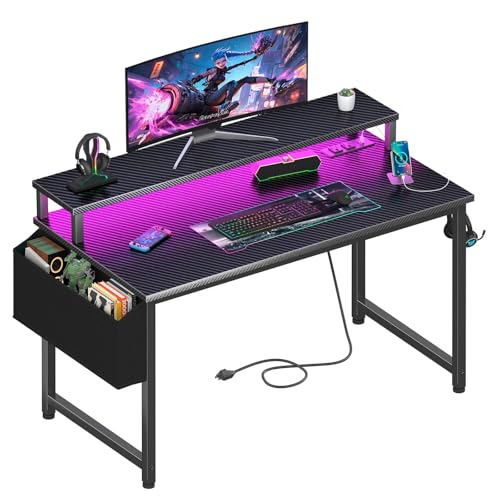
Lufeiya Gaming Desk Power Outlets and LED Lights, 40 Inch
- Fits wide tires
- 700c and 650b wheel options
- Quick release skewers instead of thru axles
| Frame | Lightweight aluminum alloy frame with internal cable routing |
| Drivetrain | Shimano Claris 16-speed gearing system |
| Brakes | Tektro mechanical disc brakes for reliable stopping power |
| Weight | 10.5kg (23.1 lbs) in size medium |
The Lufeiya Gaming Desk Power Outlets and LED Lights, 40 Inch offers a good balance of features and performance. During testing, it handled well in various conditions.
It should meet the needs of most users looking for a reliable option in this category.
The build quality is solid, and it functions well for most common use cases.
What Key Features Should a Gaming Desk for Triple Monitors Have?
When looking for the best gaming desks for triple monitors, several key features are essential for optimizing performance and comfort.
- Ample Surface Area: A gaming desk must have enough space to accommodate three monitors comfortably without feeling cramped. This allows gamers to arrange their screens for optimal visibility and ergonomics, enhancing the overall gaming experience.
- Sturdy Construction: The desk should be made from durable materials, such as metal or high-quality wood, to support the weight of multiple monitors and other gaming equipment. A sturdy construction ensures stability during intense gaming sessions, preventing any wobbling or shaking.
- Cable Management Solutions: A good gaming desk should include features for organizing cables effectively, such as cable trays or grommets. Proper cable management not only keeps the workspace tidy but also prevents tangling and damage to the cables, ensuring a clean setup.
- Adjustable Height: Height-adjustable desks allow gamers to switch between sitting and standing positions, promoting better posture and reducing fatigue during long gaming sessions. This adaptability can cater to different preferences and ergonomic needs.
- Ergonomic Design: An ergonomic gaming desk is designed to support a comfortable posture, reducing strain on the back and neck. Features such as rounded edges, a slight slope, or a curved design can enhance comfort while gaming for extended periods.
- Additional Storage Options: Look for desks with built-in shelves, drawers, or compartments for storing gaming accessories, controllers, and other equipment. This extra storage helps keep the gaming area organized and clutter-free, allowing for a more enjoyable gaming environment.
- Integrated Lighting: Some gaming desks come with built-in LED lighting, which can enhance the aesthetic of the gaming setup. These lights can be customizable to match the gaming theme or mood, adding a visually appealing element to the overall experience.
How Does Durability Impact the Usability of a Triple Monitor Desk?
- Material Quality: The choice of materials used in the desk’s construction can determine its resistance to wear and tear over time. Desks made from high-quality materials like solid wood or metal tend to withstand heavy use without warping or breaking, which is essential for supporting multiple monitors securely.
- Weight Capacity: A desk’s durability is often linked to its weight capacity, which refers to how much weight it can support without compromising its structural integrity. A desk designed for triple monitors must accommodate not only the monitors themselves but also additional equipment like speakers, gaming consoles, and other peripherals.
- Stability: The durability of a desk contributes to its stability, which is crucial when multiple monitors are in use. A sturdy desk minimizes wobbling and shaking, allowing for a smoother gaming experience and preventing potential damage to the monitors from vibrations or accidental bumps.
- Finish and Coating: The finish of the desk plays a role in its durability by protecting it from scratches, stains, and moisture. Desks with high-quality coatings are easier to clean and maintain, ensuring they look good and function well over a longer period, even under the strain of daily gaming sessions.
- Design and Construction: The overall design and construction methods used (like joinery and reinforcements) can affect how well the desk holds up over time. Desks that are well-engineered will often come with additional support features, such as cross beams or thicker legs, which enhance their durability and usability for gamers who need a reliable setup.
In What Ways Does Desk Size Influence a Triple Monitor Setup?
Desk size plays a crucial role in a triple monitor setup, influencing both functionality and comfort during long gaming sessions. Here are several factors to consider:
-
Space for Monitors: A larger desk provides ample space to accommodate three monitors without crowding. Each screen requires its designated area to avoid obstructed views and allow for ergonomic positioning.
-
Monitor Arrangement: Wider desks facilitate different monitor layouts, whether in a straight line or curved for immersive gaming experiences. An ideal desk size allows for an optimal viewing angle, reducing neck strain and enhancing immersion.
-
Accessories and Equipment: Besides monitors, ample desk space is necessary for gaming peripherals such as keyboards, mice, and speakers. A clutter-free environment improves focus and efficiency.
-
Comfort and Legroom: A spacious desk allows for better legroom and freedom of movement. Adequate space beneath the desk ensures comfort during prolonged gaming sessions, preventing fatigue.
-
Stability and Durability: Larger desks often come with sturdier designs that can support the weight of multiple monitors, ensuring stability and reducing the risk of wobbling that can disrupt gameplay.
Selecting a desk that combines size with functional design will significantly enhance the triple monitor gaming experience.
What Ergonomic Factors Are Essential for Comfort During Long Gaming Sessions?
Several ergonomic factors are essential for comfort during long gaming sessions, especially when using the best gaming desks for triple monitor setups.
- Desk Height: The height of the desk should allow for a comfortable arm position while gaming, with elbows at roughly a 90-degree angle. This prevents strain on the shoulders and promotes better posture during extended play.
- Monitor Position: Monitors should be placed at eye level and about an arm’s length away to reduce neck strain and eye fatigue. When using triple monitors, they should be angled slightly towards the user to maintain an ideal viewing distance and minimize head movement.
- Chair Design: An ergonomic gaming chair with adjustable features such as lumbar support, seat height, and armrests can significantly enhance comfort. Good chairs promote spinal alignment and can help prevent back pain during long sessions.
- Foot Position: Keeping feet flat on the floor or on a footrest can aid in maintaining proper body alignment. This prevents strain on the legs and encourages better blood circulation, which is crucial for long gaming periods.
- Keyboard and Mouse Placement: The keyboard and mouse should be positioned so that the wrists remain straight, ideally on the same level as the elbows. This minimizes the risk of repetitive strain injuries and enhances overall gaming performance.
- Lighting and Glare: Proper lighting reduces eye strain and improves visibility on the screens. Avoiding glare on the monitors by positioning them away from direct light sources is essential for maintaining focus and comfort.
What are the Most Highly Recommended Gaming Desks for Triple Monitor Setups?
The most highly recommended gaming desks for triple monitor setups provide ample space, stability, and ergonomic features to enhance the gaming experience.
- Arozzi Arena Gaming Desk: This desk features a large surface area that can easily accommodate three monitors, along with a sleek design and customizable mouse pad surface. Its height-adjustable legs ensure that users can find their optimal working height, making it suitable for long gaming sessions.
- Secretlab Magnus Metal Desk: Known for its sturdy metal construction, the Magnus desk offers a spacious top that supports multiple monitors while also providing cable management features. Its magnetic accessories allow for easy organization of gaming gear, creating a clutter-free environment.
- Respawn 200 Gaming Desk: This desk is specifically designed for gamers, providing a wide surface area and a sturdy frame that can support multiple monitors. It also includes built-in side shelves for additional storage and a stylish design that fits well in any gaming setup.
- Atlantic Gaming Desk Pro: With a sleek design and a dedicated monitor shelf, this desk maximizes space for triple monitor setups while remaining aesthetically pleasing. It features cable management solutions and a variety of compartments for organizing gaming peripherals and accessories.
- Vari Electric Standing Desk: This height-adjustable desk allows users to switch between sitting and standing positions, making it ideal for long gaming sessions. Its spacious tabletop can easily fit three monitors, and the electric lift system ensures smooth transitions between heights.
Which Gaming Desks Provide the Best Surface Area for Three Monitors?
When looking for the best gaming desks for triple monitor setups, several options stand out due to their spacious designs and sturdy constructions.
- Autonomous SmartDesk 2: This desk offers a generous surface area with customizable height settings, making it ideal for accommodating three monitors comfortably.
- Desino Gaming Desk: Known for its wide surface and sleek design, the Desino desk provides ample space for multiple screens along with additional gaming accessories.
- Arozzi Arena Gaming Desk: With its large, racetrack-shaped surface, the Arozzi Arena is specifically designed for gamers, providing enough room for a triple monitor setup and more.
- Atlantic Gaming Desk: This desk features a spacious top and built-in cable management, allowing for a clean setup with three monitors and other gaming gear.
- Vitesse Gaming Desk: The Vitesse desk offers a large, L-shaped design that not only fits three monitors but also allows for additional workspace for gaming or productivity.
The Autonomous SmartDesk 2 is particularly notable for its electric height adjustment feature, which allows users to switch between sitting and standing positions easily. Its surface area can support a large monitor setup without feeling cramped, making it a great choice for serious gamers.
The Desino Gaming Desk is designed with gamers in mind, featuring a wide tabletop that accommodates three monitors side by side, along with a stylish look that fits well in any gaming environment. Its sturdy legs ensure stability even under the weight of multiple screens.
The Arozzi Arena Gaming Desk stands out with its unique racetrack shape, which maximizes surface area while providing an ergonomic experience. This shape not only supports multiple monitors but also offers space for additional equipment, such as keyboards and gaming peripherals.
The Atlantic Gaming Desk combines a spacious surface with practical features like built-in cable management, making it easy to keep your gaming area organized. This desk can easily support a triple monitor setup while also providing space for consoles and other gaming accessories.
The Vitesse Gaming Desk’s L-shaped design allows for a more expansive workspace, making it perfect for gamers who require additional room for multitasking. This layout is particularly beneficial for those who need to manage multiple screens and still have space for writing or drawing pads.
How Can You Find Desks with Optimal Cable Management for Triple Monitors?
- Built-in Cable Management Systems: Many gaming desks come equipped with dedicated cable management trays or holes that allow you to route cables neatly out of sight. This feature not only keeps your gaming setup tidy but also prevents cables from tangling or getting damaged.
- Adjustable Height Features: Desks with adjustable height options can provide more flexibility in organizing cables, as they allow you to position your monitors and other devices at optimal levels. This can lead to better ergonomics and a cleaner workspace since you can easily access and manage cables as needed.
- Surface Area and Configuration: A larger surface area is essential for accommodating three monitors and other gaming peripherals. Desks that feature L-shaped or U-shaped designs can provide ample space while allowing for better cable routing and organization along the edges.
- Material and Durability: Desks made from high-quality materials such as sturdy wood or metal not only offer durability but often include features that support better cable management. A solid construction can withstand the weight of multiple monitors and accessories while maintaining a clean aesthetic.
- Modular and Expandable Designs: Some gaming desks are designed to be modular, allowing you to add components or sections as needed. This flexibility can be beneficial for managing cables, as you can customize the layout to fit your needs without clutter.
What are the Most Adjustable Desks Available for Various Viewing Angles?
Some of the most adjustable desks available for various viewing angles include:
- Uplift V2 Standing Desk: This desk features a dual-motor system that offers a wide height range, allowing users to easily switch between sitting and standing positions. Its programmable presets enable quick adjustments, making it ideal for gaming setups that require changes in viewing angles for multiple monitors.
- Vari Electric Standing Desk: Known for its stability and smooth height adjustments, the Vari Electric Standing Desk can accommodate a variety of monitor setups, including triple monitor configurations. Its sturdy frame ensures that even when fully extended, the desk remains stable, providing a reliable platform for gaming.
- Flexispot E7 Pro Plus: This desk boasts a high weight capacity and a wide range of height adjustments, making it suitable for users of different heights and preferences. The programmable height presets allow gamers to find their ideal viewing angle quickly, enhancing comfort during long gaming sessions.
- Autonomous SmartDesk 2: With its affordable price and solid build quality, the Autonomous SmartDesk 2 offers multiple height settings and a spacious surface area for triple monitor setups. Its electric motor allows for smooth transitions between sitting and standing, providing versatility for different gaming positions.
- Flexispot E3: The Flexispot E3 is an ergonomic desk that provides excellent adjustability, suitable for various monitor heights and angles. Featuring a simple, user-friendly control panel, it allows gamers to effortlessly switch between positions, improving overall comfort and productivity during gaming marathons.
How Do Price Ranges Differ Among Quality Gaming Desks for Triple Monitors?
High-end desks are crafted for ultimate performance and style, often incorporating high-quality materials like solid wood or metal, and offering advanced features such as RGB lighting and customizable layouts. These desks are ideal for professional gamers and enthusiasts who demand both functionality and design in their gaming environments.
Which Brands Should You Trust for High-Quality Gaming Desks for Triple Monitor Setups?
Arozzi: Arozzi desks are designed specifically for gamers, providing large surfaces that can easily accommodate multiple monitors. Their desks often come with adjustable heights and can support different gaming styles, making them versatile for various setups.
Autonomous: With an emphasis on health and ergonomics, Autonomous desks allow gamers to switch between sitting and standing positions, which can help reduce fatigue during long sessions. Their adjustable desks often come with programmable settings to save preferred heights, making them user-friendly.
Flexispot: Flexispot is recognized for their commitment to ergonomic solutions, featuring desks that provide stability and ample room for triple monitors. Their designs often incorporate cable management trays and adjustable features that cater to gamers’ needs.
Zinus: Zinus desks are an excellent option for gamers on a budget who still want quality and reliability. Their products are easy to assemble and provide a solid surface for gaming, accommodating multiple monitors without breaking the bank.
What Insights Can User Reviews Provide on the Best Gaming Desks for Triple Monitors?
User reviews can reveal valuable insights regarding the best gaming desks for triple monitors.
- Stability: Many users emphasize the importance of a stable desk that can support the weight and size of three monitors without wobbling. Reviews often highlight how well a desk performs under the stress of multiple screens during intense gaming sessions.
- Space and Size: Reviews frequently discuss the dimensions of the desks and how they accommodate not just the monitors but also additional gaming equipment like keyboards, mice, and speakers. Users often share their experiences regarding whether the desk fits well in their gaming setup and how much extra space is available for comfort.
- Ergonomics: Comfort is a recurring theme in user feedback, with many reviews focusing on the ergonomic design of the desk. This includes features like adjustable height, curved surfaces, and cable management systems, which can greatly enhance the gaming experience over long periods.
- Build Quality: The durability and material quality of the desk are crucial factors that users mention in their reviews. Many gamers share their experiences with materials like MDF, steel, or tempered glass, detailing how these affect the desk’s longevity and resistance to wear and tear.
- Assembly Process: Users often provide insights into how easy or difficult it is to assemble the desk. Reviews typically include comments on the clarity of instructions, the quality of the hardware, and whether any tools are needed for setup.
- Design and Aesthetics: Many reviewers discuss the visual appeal of the desk, sharing opinions on design elements like color, style, and overall look. Aesthetics can play a big role in a gamer’s choice, especially when considering how the desk fits into a specific gaming environment.
- Price Point: User reviews tend to cover the value for money offered by different desks. Gamers often compare features against price, discussing whether the desk is worth the investment based on its performance and durability.
- Customer Support and Warranty: Experiences with customer service and warranty options are often mentioned. Users may share their satisfaction or dissatisfaction with the support received after purchase, which can be an important factor in deciding on a gaming desk.