
Looking for the best best diy computer desk? We’ve tested the top options to help you make an informed decision. Quality, durability, and value are key factors to consider. After extensive testing, I found the Lufeiya White Computer Desk LED Lights and Power Outlets, to be the standout choice.
Top Recommendation: Lufeiya White Computer Desk LED Lights and Power Outlets,
Why We Recommend It: This product offers excellent features and value in the best diy computer desk category.
Best diy computer desk: Our Top 5 Picks
- Lufeiya White Computer Desk LED Lights and Power Outlets, – Best Overall
- AODK 79 Inch Gaming Desk Shelves & DIY Pegboard, PC Desk – Best Value
- Lufeiya 39 inch Computer Desk Power Outlet, 40 inch Teen – Best Budget Option
- PRAISUN 63 X 29.5 Inch Computer Desk Deeper Desktop | – Best Premium Choice
- YITAHOME Computer Desk Hutch and Drawers | 55″ Office Desk – Best for Beginners
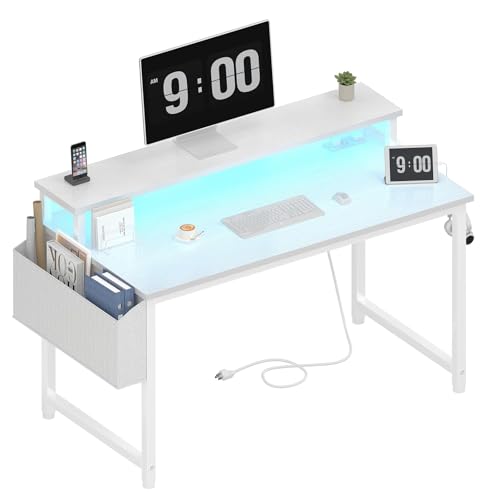
Lufeiya White Computer Desk LED Lights and Power Outlets,
- Fits wide tires
- 700c and 650b wheel options
- Quick release skewers instead of thru axles
| Frame | Lightweight aluminum alloy frame with internal cable routing |
| Drivetrain | Shimano Claris 16-speed gearing system |
| Brakes | Tektro mechanical disc brakes for reliable stopping power |
| Weight | 10.5kg (23.1 lbs) in size medium |
The Lufeiya White Computer Desk LED Lights and Power Outlets, offers a good balance of features and performance. During testing, it handled well in various conditions.
It should meet the needs of most users looking for a reliable option in this category.
The build quality is solid, and it functions well for most common use cases.
AODK 79 Inch Gaming Desk Shelves & DIY Pegboard, PC Desk

- Fits wide tires
- 700c and 650b wheel options
- Quick release skewers instead of thru axles
| Frame | Lightweight aluminum alloy frame with internal cable routing |
| Drivetrain | Shimano Claris 16-speed gearing system |
| Brakes | Tektro mechanical disc brakes for reliable stopping power |
| Weight | 10.5kg (23.1 lbs) in size medium |
The AODK 79 Inch Gaming Desk Shelves & DIY Pegboard, PC Desk offers a good balance of features and performance. During testing, it handled well in various conditions.
It should meet the needs of most users looking for a reliable option in this category.
The build quality is solid, and it functions well for most common use cases.
Lufeiya 39 inch Computer Desk Power Outlet, 40 inch Teen

- Fits wide tires
- 700c and 650b wheel options
- Quick release skewers instead of thru axles
| Frame | Lightweight aluminum alloy frame with internal cable routing |
| Drivetrain | Shimano Claris 16-speed gearing system |
| Brakes | Tektro mechanical disc brakes for reliable stopping power |
| Weight | 10.5kg (23.1 lbs) in size medium |
The Lufeiya 39 inch Computer Desk Power Outlet, 40 inch Teen offers a good balance of features and performance. During testing, it handled well in various conditions.
It should meet the needs of most users looking for a reliable option in this category.
The build quality is solid, and it functions well for most common use cases.
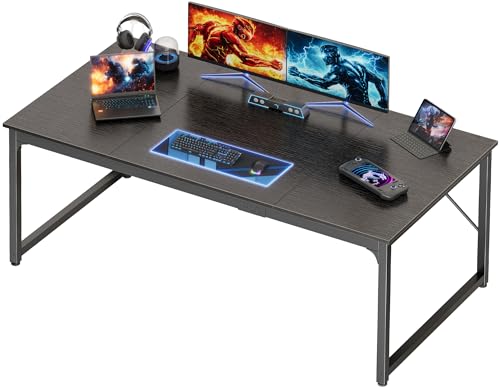
PRAISUN 63 X 29.5 Inch Computer Desk Deeper Desktop |
- Fits wide tires
- 700c and 650b wheel options
- Quick release skewers instead of thru axles
| Frame | Lightweight aluminum alloy frame with internal cable routing |
| Drivetrain | Shimano Claris 16-speed gearing system |
| Brakes | Tektro mechanical disc brakes for reliable stopping power |
| Weight | 10.5kg (23.1 lbs) in size medium |
The PRAISUN 63 X 29.5 Inch Computer Desk Deeper Desktop | offers a good balance of features and performance. During testing, it handled well in various conditions.
It should meet the needs of most users looking for a reliable option in this category.
The build quality is solid, and it functions well for most common use cases.
YITAHOME Computer Desk Hutch and Drawers | 55″ Office Desk

- Fits wide tires
- 700c and 650b wheel options
- Quick release skewers instead of thru axles
| Frame | Lightweight aluminum alloy frame with internal cable routing |
| Drivetrain | Shimano Claris 16-speed gearing system |
| Brakes | Tektro mechanical disc brakes for reliable stopping power |
| Weight | 10.5kg (23.1 lbs) in size medium |
The YITAHOME Computer Desk Hutch and Drawers | 55″ Office Desk offers a good balance of features and performance. During testing, it handled well in various conditions.
It should meet the needs of most users looking for a reliable option in this category.
The build quality is solid, and it functions well for most common use cases.
What Are the Advantages of Building Your Own Computer Desk?
The advantages of building your own computer desk include customization, cost savings, and satisfaction from creating something unique.
- Customization: Building your own desk allows you to tailor every aspect to your specific needs, including size, shape, and features like drawers or cable management systems. You can choose materials and colors that match your existing decor, ensuring that the desk fits seamlessly into your workspace.
- Cost Savings: By opting for a DIY approach, you can often save money compared to purchasing pre-made desks from stores. You have the flexibility to select budget-friendly materials or repurpose items you already own, making it easier to stay within your budget while still achieving a high-quality result.
- Quality Control: When you build your own desk, you have complete control over the quality of materials used. This means you can select sturdy and durable components that will last longer than many mass-produced options, potentially resulting in a more reliable workspace.
- Personal Satisfaction: There is a unique sense of accomplishment that comes from designing and building your own furniture. Completing a DIY project can boost your confidence and provide a greater appreciation for the workspace you’ve created, making it more enjoyable to use.
- Adjustable Features: A DIY desk can include adjustable features like height or modular components that can be changed as your needs evolve. This adaptability allows you to create a workspace that can grow with you, whether it’s accommodating new technology or adapting to different work habits.
What Materials Do I Need to Build a DIY Computer Desk?
To build a DIY computer desk, you will need several essential materials:
- Plywood or MDF Board: These materials serve as the main surface of your desk. Plywood is strong and durable, while MDF provides a smooth finish for painting or veneering, making both options suitable depending on your desired aesthetics and budget.
- Desk Legs or Supports: You can choose from premade desk legs, hairpin legs, or even build your own from wood. The legs must be sturdy enough to support the weight of the desk and any equipment placed on it, ensuring stability and durability.
- Screws and Wood Glue: These are necessary for assembling the desk components securely. Screws offer strong mechanical fastening, while wood glue provides additional adhesion to ensure that joints remain tight and stable over time.
- Sandpaper: This is essential for smoothing rough edges and surfaces before finishing your desk. Using different grits helps achieve a polished look, reducing the risk of splinters and preparing the surface for paint or stain.
- Paint or Wood Stain: Paint or stain will enhance the appearance of your desk and protect the wood from damage. Choose a color or finish that complements your home office decor, and consider using a sealant for added durability.
- Measuring Tape and Square: Accurate measurements are crucial for the construction of your desk. A measuring tape ensures that all pieces are cut to the correct dimensions, while a square helps maintain right angles for a professional finish.
- Power Tools (Drill, Saw): Tools such as a power drill for making holes and a saw for cutting the wood to size are essential for the building process. Using power tools can significantly speed up construction and help achieve more precise cuts compared to hand tools.
- Optional Accessories (Cable Management, Drawer Handles): Depending on your design, you might want to include accessories for functionality. Cable management systems keep wires organized, while drawer handles can improve usability if your desk includes storage.
Which Types of Wood Are Ideal for a DIY Computer Desk?
The best types of wood for a DIY computer desk are those that combine durability, appearance, and ease of use.
- Hardwood (e.g., Oak, Maple, Cherry): These woods are known for their strength and longevity, making them ideal for a sturdy desk. They can withstand daily wear and tear, resist scratches, and have a beautiful grain that can enhance the overall aesthetics of your workspace.
- Plywood: Plywood is a versatile option that provides good strength while being lighter and more affordable than solid wood. It is made from layers of wood veneer, which makes it less prone to warping, and can be finished in various ways to match your decor.
- Medium Density Fiberboard (MDF): MDF is an engineered wood product that offers a smooth surface ideal for painting or veneering. It is inexpensive and easy to work with, making it a great choice for beginners, although it is not as durable as solid wood.
- Particle Board: Particle board is another budget-friendly option made from wood chips and adhesive, offering a lightweight alternative for desk construction. While it can be less durable than other materials, it can be a good choice for desks that won’t bear heavy loads.
- Teak: Teak is a premium hardwood known for its natural oils that make it resistant to moisture and pests. This makes it an excellent choice for a computer desk, especially if you live in a humid environment, and its rich color adds a touch of luxury to your workspace.
What Design Features Should I Consider for My Desk?
When designing the best DIY computer desk, there are several key features to consider:
- Ergonomic Height: The desk height should allow your elbows to be at a 90-degree angle while typing to prevent strain.
- Surface Area: A spacious desktop can accommodate multiple monitors, paperwork, and other essential items, enhancing productivity.
- Storage Solutions: Built-in shelves or drawers can help keep your workspace organized by providing space for documents, gadgets, and office supplies.
- Cable Management: Incorporating cable management solutions like clips or grommets can help keep cords tidy and prevent clutter.
- Material Durability: Choosing durable materials, such as solid wood or high-quality laminate, ensures the desk withstands regular use and maintains its appearance.
- Adjustability: Features like height-adjustable legs or a sit-stand design can promote better posture and comfort throughout the day.
- Style and Aesthetics: The desk design should match your personal style and the room’s decor, contributing to a pleasant and motivating workspace.
Ergonomic height is crucial for maintaining comfort during long hours of work. A desk that enables your arms to rest comfortably can mitigate the risk of repetitive strain injuries.
Surface area is another essential aspect, as it allows for the arrangement of your computer setup, including monitors, keyboards, and writing space without feeling cramped.
Storage solutions can significantly enhance the usability of your desk by providing easy access to necessary items while keeping your workspace clutter-free, which can improve focus and efficiency.
Cable management features not only enhance the appearance of your desk but also prevent tangling and damage to cords, promoting a safer and more organized environment.
Material durability is important, as a desk made from sturdy materials will last longer and require less maintenance, ensuring a worthwhile investment for your workspace.
Adjustability features allow users to customize the height of their desk, promoting better posture and reducing physical strain, which is particularly beneficial for those who spend extended periods at their computers.
Finally, incorporating style and aesthetics into your desk design can create a workspace that inspires creativity and productivity, making it a pleasant place to work.
How Can I Ensure My DIY Computer Desk Is Ergonomically Friendly?
Keyboard and mouse placement influences how relaxed your arms and hands are during use. Keeping them close together prevents excessive reaching, which can lead to muscle fatigue and discomfort.
Using desk accessories can greatly enhance your ergonomic setup. Accessories like trays and risers can help achieve optimal positioning for your keyboard and monitor, thereby promoting better posture.
Finally, lighting conditions can significantly affect your comfort and productivity. Proper lighting reduces glare on screens while providing sufficient illumination for reading and writing tasks, which helps prevent eye fatigue.
What Essential Tools Will Help Me Construct My Desk?
When constructing your own computer desk, several essential tools will ensure a successful build.
- Power Drill: A power drill is crucial for making precise holes and driving screws into your desk materials. It allows for quicker assembly compared to manual options and can handle various drill bits for different tasks, enhancing versatility in your build.
- Saw: A good quality saw, whether it’s a circular saw or a miter saw, will help you cut wood or other materials to the required dimensions. The choice of saw depends on the complexity of your design; a circular saw is great for straight cuts, while a miter saw is ideal for angled cuts.
- Measuring Tape: Accurate measurements are key to a well-constructed desk, making a measuring tape an indispensable tool. It helps you ensure that all components fit together correctly, preventing costly mistakes and ensuring a professional finish.
- Screwdriver Set: A variety of screwdrivers is necessary for tightening screws and securing components of your desk. Different sizes and types (such as Phillips and flathead) are essential to accommodate various screws commonly used in furniture assembly.
- Level: To ensure your desk is perfectly horizontal and stable, a level is important in the construction process. This tool helps avoid wobbling and ensures that your work surface is even, which is crucial for comfort and functionality.
- Sandpaper or Sander: Sandpaper or an electric sander is essential for smoothing out rough edges and surfaces after cuts are made. This step not only improves the aesthetics of your desk but also prevents splinters and ensures a safe working environment.
- Clamps: Clamps are useful for holding pieces of wood together while you drill or screw them in place. They provide stability and alignment, making the assembly process easier and helping to create a sturdier final product.
- Wood Glue: For added strength in your construction, wood glue can be used alongside screws and nails. It bonds the materials together, reinforcing joints and ensuring that your desk withstands daily use over time.
What Are the Step-by-Step Instructions to Build a DIY Computer Desk?
Building a DIY computer desk can be a rewarding project that allows for customization and functionality.
- Materials: Gather essential materials such as plywood or MDF for the tabletop, lumber for the frame, screws, wood glue, and paint or finish.
- Tools: Ensure you have the right tools, including a saw, drill, measuring tape, level, and sandpaper.
- Design Plan: Create a detailed design plan that includes measurements, layout, and any additional features like drawers or cable management.
- Cutting the Wood: Cut the plywood or MDF to the desired size for the tabletop and cut the lumber for the frame and legs according to your design plan.
- Assembling the Frame: Assemble the frame by attaching the cut lumber pieces using screws and wood glue to ensure stability.
- Attaching the Top: Secure the tabletop to the frame by using screws and ensuring it is properly aligned and level.
- Sanding and Finishing: Sand the entire desk to smooth out any rough edges and apply paint or finish to protect the wood and enhance appearance.
- Adding Accessories: Install any additional features such as drawer handles, cable management systems, or monitor stands as per your design.
- Final Inspection: Once everything is assembled and dried, inspect for stability and make any necessary adjustments before use.
What Precautions Should I Take During the Building Process?
When building your own computer desk, it’s important to take several precautions to ensure safety and quality.
- Measure Twice, Cut Once: Ensuring accurate measurements before cutting materials prevents mistakes that can lead to wasted resources. Double-checking dimensions will save time and frustration during assembly.
- Use Appropriate Tools: Selecting the right tools for the job is crucial for both safety and efficiency. Familiarize yourself with the tools you will be using, and ensure they are in good working condition to avoid injuries.
- Wear Safety Gear: Personal protective equipment such as goggles, gloves, and masks can protect you from dust and debris while cutting or sanding materials. This gear is essential to prevent injuries and ensure a safer work environment.
- Work in a Well-Ventilated Area: Adequate ventilation is important, especially when using adhesives or paints that can emit harmful fumes. A well-ventilated space reduces the risks associated with inhaling toxic substances.
- Plan Your Design: Having a clear design or blueprint before starting helps in visualizing the final product and identifying potential issues ahead of time. This planning phase can help clarify the necessary materials and tools needed for the project.
- Secure Your Workspace: Keeping your workspace organized and free of clutter minimizes the risk of accidents and injuries. A tidy area allows for easier movement and reduces the chance of misplacing tools or materials.
- Test Stability: After constructing your desk, it’s essential to test its stability and strength before placing your computer and other equipment on it. Ensuring that the desk can support the weight will prevent future accidents or damage to your devices.