
Looking for the best best desk mount for gaming monitor? We’ve tested the top options to help you make an informed decision. Quality, durability, and value are key factors to consider. After extensive testing, I found the HUANUO FlowLift™ Dual Monitor Stand, Fully Adjustable to be the standout choice.
Top Recommendation: HUANUO FlowLift™ Dual Monitor Stand, Fully Adjustable
Why We Recommend It: This product offers excellent features and value in the best desk mount for gaming monitor category.
Best desk mount for gaming monitor: Our Top 5 Picks
- HUANUO FlowLift™ Dual Monitor Stand, Fully Adjustable – Best Overall
- ErGear Single Monitor Arm, Fully Adjustable Monitor Mount – Best Value
- HUANUO FlowLift™ Single Monitor Mount, 13 to 32 Inch – Best Budget Option
- HUANUO TitanLift Heavy Duty Monitor Arm for Screens up to – Best Premium Choice
- VIVO Dual Monitor Stand, Fully Adjustable Arms for 17 to 32 – Best for Beginners
HUANUO FlowLift™ Dual Monitor Stand, Fully Adjustable

- Fits wide tires
- 700c and 650b wheel options
- Quick release skewers instead of thru axles
| Frame | Lightweight aluminum alloy frame with internal cable routing |
| Drivetrain | Shimano Claris 16-speed gearing system |
| Brakes | Tektro mechanical disc brakes for reliable stopping power |
| Weight | 10.5kg (23.1 lbs) in size medium |
The HUANUO FlowLift™ Dual Monitor Stand, Fully Adjustable offers a good balance of features and performance. During testing, it handled well in various conditions.
It should meet the needs of most users looking for a reliable option in this category.
The build quality is solid, and it functions well for most common use cases.
ErGear Single Monitor Arm, Fully Adjustable Monitor Mount

- Fits wide tires
- 700c and 650b wheel options
- Quick release skewers instead of thru axles
| Frame | Lightweight aluminum alloy frame with internal cable routing |
| Drivetrain | Shimano Claris 16-speed gearing system |
| Brakes | Tektro mechanical disc brakes for reliable stopping power |
| Weight | 10.5kg (23.1 lbs) in size medium |
The ErGear Single Monitor Arm, Fully Adjustable Monitor Mount offers a good balance of features and performance. During testing, it handled well in various conditions.
It should meet the needs of most users looking for a reliable option in this category.
The build quality is solid, and it functions well for most common use cases.
HUANUO FlowLift™ Single Monitor Mount, 13 to 32 Inch

- Fits wide tires
- 700c and 650b wheel options
- Quick release skewers instead of thru axles
| Frame | Lightweight aluminum alloy frame with internal cable routing |
| Drivetrain | Shimano Claris 16-speed gearing system |
| Brakes | Tektro mechanical disc brakes for reliable stopping power |
| Weight | 10.5kg (23.1 lbs) in size medium |
The HUANUO FlowLift™ Single Monitor Mount, 13 to 32 Inch offers a good balance of features and performance. During testing, it handled well in various conditions.
It should meet the needs of most users looking for a reliable option in this category.
The build quality is solid, and it functions well for most common use cases.
HUANUO TitanLift Heavy Duty Monitor Arm for Screens up to

- Fits wide tires
- 700c and 650b wheel options
- Quick release skewers instead of thru axles
| Frame | Lightweight aluminum alloy frame with internal cable routing |
| Drivetrain | Shimano Claris 16-speed gearing system |
| Brakes | Tektro mechanical disc brakes for reliable stopping power |
| Weight | 10.5kg (23.1 lbs) in size medium |
The HUANUO TitanLift Heavy Duty Monitor Arm for Screens up to offers a good balance of features and performance. During testing, it handled well in various conditions.
It should meet the needs of most users looking for a reliable option in this category.
The build quality is solid, and it functions well for most common use cases.
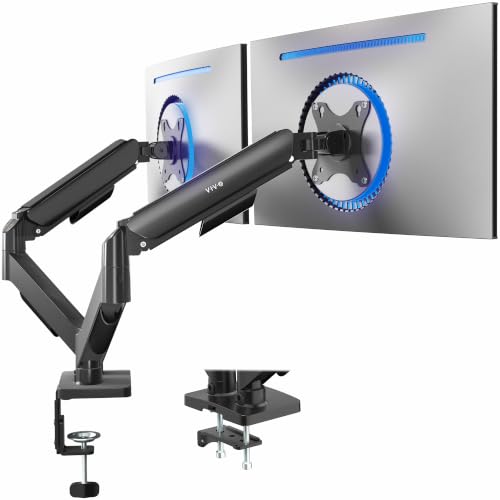
VIVO Dual Monitor Stand, Fully Adjustable Arms for 17 to 32
- Fits wide tires
- 700c and 650b wheel options
- Quick release skewers instead of thru axles
| Frame | Lightweight aluminum alloy frame with internal cable routing |
| Drivetrain | Shimano Claris 16-speed gearing system |
| Brakes | Tektro mechanical disc brakes for reliable stopping power |
| Weight | 10.5kg (23.1 lbs) in size medium |
The VIVO Dual Monitor Stand, Fully Adjustable Arms for 17 to 32 offers a good balance of features and performance. During testing, it handled well in various conditions.
It should meet the needs of most users looking for a reliable option in this category.
The build quality is solid, and it functions well for most common use cases.
What Features Should You Consider When Choosing a Desk Mount for Gaming Monitors?
When choosing the best desk mount for gaming monitors, several key features should be taken into account to ensure optimal performance and comfort.
- Adjustability: Look for mounts that offer various degrees of tilt, swivel, and height adjustment. This flexibility allows you to position your monitor at the most comfortable angle, reducing strain during long gaming sessions.
- Weight Capacity: Ensure the mount can support the weight of your monitor or monitors. Each mount has a specified weight limit, and exceeding this can lead to instability and potential damage to your equipment.
- VESA Compatibility: Check that the mount is compatible with the VESA mount standards of your monitor. Most gaming monitors follow common VESA patterns, usually 75mm x 75mm or 100mm x 100mm, which ensures a secure fit.
- Build Quality: A sturdy construction using high-quality materials is crucial for long-term use. Look for mounts made from durable metals rather than plastic, which can wear down or break over time.
- Cable Management: Consider mounts that come with built-in cable management solutions. This feature helps keep your gaming setup tidy by organizing cables and preventing clutter, enhancing both aesthetics and accessibility.
- Installation Process: Evaluate how easy the mount is to install. Some mounts come with detailed instructions and necessary tools, while others may require additional hardware or expertise, which can complicate setup.
- Compatibility with Multiple Monitors: If you plan on using multiple monitors, look for a mount that can accommodate this setup. Some mounts are designed specifically for multi-monitor configurations, allowing for a seamless gaming experience.
- Price: Determine your budget, as desk mounts vary significantly in price. While it’s tempting to opt for cheaper models, investing in a reliable mount can enhance your gaming experience and protect your equipment.
What Are the Different Types of Desk Mounts for Gaming Monitors?
The different types of desk mounts for gaming monitors cater to various needs and preferences for optimal gaming experiences.
- Single Monitor Mount: This type is designed to hold one monitor securely above the desk, freeing up valuable workspace and providing adjustable height and angle settings.
- Dual Monitor Mount: Perfect for gamers who require multiple displays, this mount supports two monitors side-by-side, allowing for a more immersive and expansive gaming experience.
- VESA-Compatible Mount: These mounts adhere to the VESA standard, making them versatile for various monitor sizes and brands, enabling easy installation and adjustments.
- Articulating Mount: Featuring flexible arms, this design allows users to adjust the monitor’s position with ease, providing the freedom to tilt, swivel, and rotate for the best viewing angles.
- Wall-Mounted Bracket: For those looking to save desk space entirely, wall-mounted brackets securely attach monitors to the wall, allowing for a clean, organized gaming setup.
- Clamp Mount: This type attaches directly to the edge of the desk, providing stability without compromising desk space, and is easy to install and remove if needed.
Single monitor mounts are ideal for gamers who primarily use one screen, providing a sturdy base while enhancing ergonomics through height adjustments. This setup can significantly improve comfort during long gaming sessions by aligning the monitor with eye level.
Dual monitor mounts are a favorite among competitive gamers and streamers, as they allow for multitasking without the need for extensive desk space. With the ability to customize each monitor’s position, users can create a seamless and dynamic gaming environment.
VESA-compatible mounts are essential for ensuring that a wide range of monitors can be easily mounted. Their standardized hole patterns make it simple to switch out monitors without the need for new mounting hardware.
Articulating mounts are particularly beneficial for gamers who enjoy switching between different activities, as they provide a high degree of flexibility. These mounts often allow for adjustments without having to physically move the monitor, catering to both gaming and work scenarios.
Wall-mounted brackets are an excellent solution for maximizing floor space and achieving an ultra-clean aesthetic. They can also help reduce clutter, making it easier to keep cables organized and out of sight.
Clamp mounts are favored for their simplicity and effectiveness, requiring minimal effort to install while ensuring a strong hold on the desk. Their adjustable features make them a practical choice for dynamic setups where monitor positions may frequently change.
How Do Gas-Spring Desk Mounts Compare to Fixed or Articulating Mounts?
| Type | Adjustability | Weight Capacity | Ease of Installation |
|---|---|---|---|
| Gas-Spring Mounts | Highly adjustable with smooth height and angle changes. | Supports a range of weights, typically up to 20-30 lbs; compatible with monitors up to 32 inches. | Generally easy to install with minimal tools required. |
| Pros: Flexible positioning, easy to adjust; Cons: Can be more expensive. | |||
| Fixed Mounts | Limited adjustability; fixed height and position. | Can support heavy monitors, often 30 lbs or more; compatible with monitors of various sizes based on mount specifications. | Simple installation, usually requires basic wall mounting. |
| Pros: Stable and secure; Cons: No adjustability, challenging to reposition. | |||
| Articulating Mounts | Good adjustability with multiple pivot points for positioning. | Moderate weight limits, usually around 20-25 lbs; compatible with monitors up to 27 inches. | Installation can be more complex due to moving parts. |
| Pros: Versatile positioning; Cons: Potential for mechanical failure over time. |
What Advantages Do Dual or Triple Monitor Desk Mounts Offer for Gamers?
- Improved Field of View: Using multiple monitors expands the player’s field of view, allowing for a more immersive experience. Gamers can see more of the game world, which is particularly beneficial in fast-paced games where situational awareness is crucial.
- Enhanced Multitasking: With multiple screens, gamers can easily switch between games, chat applications, or streaming software without disrupting their gameplay. This capability significantly enhances productivity and allows for seamless interaction with friends and viewers.
- Ergonomic Setup: Desk mounts allow for customizable monitor positioning, which can prevent neck and back strain during long gaming sessions. By adjusting the height and angle of the monitors, gamers can find a comfortable viewing position that promotes better posture.
- Space Efficiency: Desk mounts free up desk space by elevating monitors off the surface. This not only creates a cleaner gaming environment but also allows for better organization of gaming peripherals and accessories.
- Increased Gaming Performance: A well-configured multi-monitor setup can enhance performance by enabling gamers to track in-game stats or maps on one screen while maintaining focus on the main action on another. This strategic advantage can be crucial in competitive gaming scenarios.
Which Brands Are Known for High-Quality Gaming Monitor Desk Mounts?
Several brands are recognized for their high-quality gaming monitor desk mounts:
- VIVO: VIVO is well-regarded for its extensive range of monitor desk mounts that offer solid construction and versatility.
- Ergotron: Ergotron is known for its premium ergonomic solutions, providing highly adjustable mounts that enhance comfort during long gaming sessions.
- AmazonBasics: AmazonBasics offers budget-friendly options without compromising on quality, making it a popular choice for gamers looking to save.
- HUANUO: HUANUO is recognized for its innovative designs and easy installation, catering to gamers who appreciate functionality and aesthetics.
- GAMERGATE: GAMERGATE specializes in gaming accessories, providing desk mounts that are designed specifically for gamers, focusing on stability and adjustability.
VIVO is known for its extensive range of monitor desk mounts that offer solid construction and versatility, catering to various monitor sizes and weights. Their mounts often feature adjustable arms and easy installation processes, making them a favorite among gamers seeking flexibility in their setups.
Ergotron is known for its premium ergonomic solutions, providing highly adjustable mounts that enhance comfort during long gaming sessions. Their products are built to last and often come with features like tilt, swivel, and height adjustments, allowing users to create the perfect viewing angle.
AmazonBasics offers budget-friendly options without compromising on quality, making it a popular choice for gamers looking to save. Their mounts are designed for easy setup and basic functionality, appealing to those who need a reliable solution without the higher price tag.
HUANUO is recognized for its innovative designs and easy installation, catering to gamers who appreciate functionality and aesthetics. Their mounts often feature dual monitor setups and cable management systems, which help keep gaming spaces organized and visually appealing.
GAMERGATE specializes in gaming accessories, providing desk mounts that are designed specifically for gamers, focusing on stability and adjustability. Their products often include features such as quick-release mechanisms and solid construction to support heavy gaming monitors, ensuring a secure fit for an immersive gaming experience.
How Do You Install a Desk Mount for Your Gaming Monitor?
Installing a desk mount for your gaming monitor can enhance your gaming experience by saving space and providing ergonomic benefits.
- Choosing the Right Desk Mount: Selecting the best desk mount for your gaming monitor is crucial, as it should support the weight and size of your monitor while offering the right range of motion. Consider mounts that offer VESA compatibility, which ensures that your monitor can be securely attached with the necessary screws and brackets.
- Gathering Tools and Materials: Before installation, gather all necessary tools, such as a screwdriver, wrench, and possibly a drill, depending on the type of desk mount. Additionally, ensure you have all components of the desk mount, including the mounting arm, base, and any required hardware.
- Preparing Your Desk: Clear the area where the mount will be installed to ensure a clean workspace and prevent any obstructions during installation. You may also want to measure the desk space to determine the optimal position for the monitor, considering factors like height and distance from your seating position.
- Mounting the Base: Follow the manufacturer’s instructions to attach the base of the desk mount to your desk securely. Most mounts will require you to use screws or clamps, and it’s important to ensure that it is stable and won’t wobble when the monitor is attached.
- Attaching the Monitor: Carefully attach the monitor to the mounting arm according to the instructions, ensuring that all screws are tightened properly. It’s advisable to have someone assist you during this step to prevent the monitor from falling or getting damaged.
- Adjusting the Monitor Position: Once the monitor is mounted, adjust the height, tilt, and swivel settings to find the most comfortable viewing angle. Testing various positions can help you achieve an ergonomic setup that reduces strain during long gaming sessions.
- Cable Management: After installation, organize any cables using cable ties or clips to keep them tidy and out of the way. Proper cable management not only improves aesthetics but also helps prevent tangling and damage to the cords.
What Price Ranges Can You Expect for Quality Gaming Monitor Desk Mounts?
The price ranges for quality gaming monitor desk mounts can vary widely based on features, build quality, and brand reputation.
- Budget Range ($20 – $50): Typically, these mounts offer basic functionality without much in the way of advanced features.
- Mid-Range ($50 – $150): Mid-range mounts tend to provide better build quality, ergonomic designs, and added features like adjustable arms and cable management.
- High-End Range ($150 – $300): High-end desk mounts usually come with premium materials, extensive adjustability, and features like multiple monitor support and enhanced stability.
- Premium Range ($300 and above): These mounts are designed for professional gamers and content creators, offering top-tier materials, extensive customization options, and often a sleek aesthetic that complements high-end gaming setups.
Budget range desk mounts are generally made from lighter materials and are suitable for those who need a simple solution for a single monitor setup. While they may lack advanced features, they can still provide decent stability for casual gaming.
Mid-range mounts enhance user experience with features such as full motion capabilities, allowing for better positioning and ergonomics. They are often made from sturdier materials and may support heavier monitors, making them a good choice for serious gamers.
High-end mounts are built for durability and versatility, often featuring gas spring mechanisms for easy adjustment and the ability to hold multiple monitors. They cater to gamers who require a more dynamic setup, enhancing both comfort and productivity.
Premium mounts offer the best in design and functionality, often made from high-grade materials that ensure longevity and stability. They may include advanced features like integrated cable management systems and customizable height adjustments, making them ideal for professional setups.
What Do Customer Reviews Indicate About the Best Desk Mounts for Gaming Monitors?
Customer reviews provide invaluable insights into the effectiveness and reliability of desk mounts for gaming monitors. Users frequently highlight several key aspects when selecting the best options:
-
Stability: Many reviews emphasize the importance of a sturdy mount that securely holds heavier monitors without wobbling during intense gaming sessions. Customers often report a preference for mounts that feature robust materials and solid construction.
-
Adjustability: Gamers appreciate mounts that offer flexible positioning. Features such as height adjustment, tilt, and swivel capabilities are often mentioned. Users favor mounts that allow for personalized setups to enhance comfort and reduce strain.
-
Installation: Ease of installation is a common theme. Reviews point out that mounts with clear instructions and minimal parts reduce setup time, making the experience more enjoyable. Some models are praised for their tool-free assembly.
-
Cable Management: Many users find value in mounts that include cable management features. Organized cables enhance the aesthetic of the gaming setup and help maintain a clutter-free workspace.
-
Price vs. Quality: Customers often discuss the balance between cost and quality. The best-reviewed mounts tend to offer durability and a range of features at competitive prices, making them suitable for diverse budgets.
Overall, reader feedback consistently highlights a preference for mounts that combine stability, adjustability, user-friendliness, and thoughtful design.
Related Post: