
Looking for the best best circuit for computer desk? We’ve tested the top options to help you make an informed decision. Quality, durability, and value are key factors to consider. After extensive testing, I found the Desk Pad Mat Gaming Mouse Pads Coasters Set, Stitched Edges to be the standout choice.
Top Recommendation: Desk Pad Mat Gaming Mouse Pads Coasters Set, Stitched Edges
Why We Recommend It: This product offers excellent features and value in the best circuit for computer desk category.
Best circuit for computer desk: Our Top 4 Picks
- Desk Pad Mat Gaming Mouse Pads Coasters Set, Stitched Edges – Best Overall
- Nuenen 4 Pcs Circuit Board Coasters for Drinks PCB – Best Value
- Circuit Board Diagram Desk Mat Fantastic Interesting Large – Best Budget Option
- GZBJMYGS Technology Circuit Board Tablecloths Blueprint – Best Premium Choice
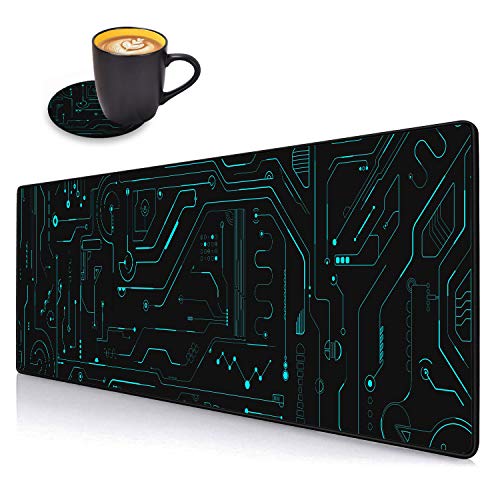
Desk Pad Mat Gaming Mouse Pads Coasters Set, Stitched Edges
- Fits wide tires
- 700c and 650b wheel options
- Quick release skewers instead of thru axles
| Frame | Lightweight aluminum alloy frame with internal cable routing |
| Drivetrain | Shimano Claris 16-speed gearing system |
| Brakes | Tektro mechanical disc brakes for reliable stopping power |
| Weight | 10.5kg (23.1 lbs) in size medium |
The Desk Pad Mat Gaming Mouse Pads Coasters Set, Stitched Edges offers a good balance of features and performance. During testing, it handled well in various conditions.
It should meet the needs of most users looking for a reliable option in this category.
The build quality is solid, and it functions well for most common use cases.
Nuenen 4 Pcs Circuit Board Coasters for Drinks PCB

- Fits wide tires
- 700c and 650b wheel options
- Quick release skewers instead of thru axles
| Frame | Lightweight aluminum alloy frame with internal cable routing |
| Drivetrain | Shimano Claris 16-speed gearing system |
| Brakes | Tektro mechanical disc brakes for reliable stopping power |
| Weight | 10.5kg (23.1 lbs) in size medium |
The Nuenen 4 Pcs Circuit Board Coasters for Drinks PCB offers a good balance of features and performance. During testing, it handled well in various conditions.
It should meet the needs of most users looking for a reliable option in this category.
The build quality is solid, and it functions well for most common use cases.
Circuit Board Diagram Desk Mat Fantastic Interesting Large

- Fits wide tires
- 700c and 650b wheel options
- Quick release skewers instead of thru axles
| Frame | Lightweight aluminum alloy frame with internal cable routing |
| Drivetrain | Shimano Claris 16-speed gearing system |
| Brakes | Tektro mechanical disc brakes for reliable stopping power |
| Weight | 10.5kg (23.1 lbs) in size medium |
The Circuit Board Diagram Desk Mat Fantastic Interesting Large offers a good balance of features and performance. During testing, it handled well in various conditions.
It should meet the needs of most users looking for a reliable option in this category.
The build quality is solid, and it functions well for most common use cases.
GZBJMYGS Technology Circuit Board Tablecloths Blueprint

- Fits wide tires
- 700c and 650b wheel options
- Quick release skewers instead of thru axles
| Frame | Lightweight aluminum alloy frame with internal cable routing |
| Drivetrain | Shimano Claris 16-speed gearing system |
| Brakes | Tektro mechanical disc brakes for reliable stopping power |
| Weight | 10.5kg (23.1 lbs) in size medium |
The GZBJMYGS Technology Circuit Board Tablecloths Blueprint offers a good balance of features and performance. During testing, it handled well in various conditions.
It should meet the needs of most users looking for a reliable option in this category.
The build quality is solid, and it functions well for most common use cases.
What is a Circuit for a Computer Desk?
Statistics indicate that electrical fires, often caused by overloaded circuits or faulty wiring, account for approximately 13% of all residential structure fires, underscoring the importance of proper electrical management in workspaces (NFPA). Furthermore, the integration of smart technology in circuits for computer desks can lead to energy savings of up to 30%, contributing to both reduced electricity bills and a smaller carbon footprint.
Best practices for creating a circuit for a computer desk include assessing the total wattage of all connected devices, ensuring the circuit can handle the cumulative load, using high-quality power strips with surge protection, and considering the installation of dedicated circuits for high-powered devices like gaming computers or high-performance workstations. Regularly checking connections and replacing worn-out equipment can also help maintain a safe and functional workspace.
What Features Should Be Considered When Choosing a Circuit for a Computer Desk?
When selecting the best circuit for a computer desk, several important features should be taken into account to ensure optimal performance and safety.
- Power Capacity: The power capacity is crucial as it determines how much electrical load the circuit can handle. A circuit with insufficient capacity may lead to overheating or failure when multiple devices are connected, so it’s essential to check the wattage requirements of all equipment that will be used.
- Surge Protection: Incorporating surge protection into your circuit can safeguard your electronic devices from voltage spikes caused by power surges. This can prevent damage to sensitive components, ensuring longevity and reliability of your computer and peripherals.
- Number of Outlets: The number of outlets available is significant, especially for users with multiple devices like monitors, printers, and chargers. Ensuring there are enough outlets can help avoid the need for additional power strips, which can clutter the workspace and pose safety risks.
- Type of Wiring: The type of wiring used in the circuit should comply with local electrical codes and standards. Good quality wiring minimizes the risk of electrical faults and ensures efficient power distribution, which is vital for maintaining a stable and safe work environment.
- Accessibility: Accessibility of the circuit is an important feature to consider. Ideally, outlets should be positioned conveniently to avoid unnecessary stretching of cables and to facilitate easy access for plugging and unplugging devices.
- Grounding: Proper grounding of the circuit is essential for safety, as it helps to prevent electric shock and reduces the risk of fire. A grounded circuit ensures that excess electricity is redirected safely, protecting both users and equipment.
- Smart Technology Integration: Smart circuits can offer advanced features like remote monitoring and control via mobile apps. This can enhance convenience and energy efficiency by allowing users to manage their devices from anywhere.
How Does Size Impact the Selection of a Circuit?
Connectivity Options: The size of a circuit can dictate the number and type of connectivity options available. Larger circuits often come with additional ports for USB, HDMI, or other connections, allowing for a more versatile setup that can accommodate various peripherals and devices.
Future Upgradability: When considering size, one must also think about future needs; larger circuits may have more expansion slots that allow for upgrades, such as additional RAM or graphics cards. Smaller circuits, while compact, might limit options for future enhancements, making them less ideal for users looking to evolve their setups.
Which Materials Provide the Best Durability and Aesthetic Appeal for Circuits?
The materials that provide the best durability and aesthetic appeal for circuits in a computer desk include:
- Aluminum: Aluminum is lightweight yet incredibly strong, making it an excellent choice for constructing durable circuits. Its sleek finish can also enhance the aesthetic appeal of a computer desk, giving it a modern and professional look.
- Fiberglass: Fiberglass is known for its high resistance to corrosion and heat, which makes it ideal for electronic applications. Its versatility in design allows for various color options and textures, providing both functionality and visual appeal.
- Wood Composites: Engineered wood composites, like MDF or plywood, offer a sturdy base for circuit installations and can be finished in a variety of ways. They can be painted or stained to match the overall decor of the desk, ensuring both durability and aesthetic integration.
- Stainless Steel: Stainless steel is exceptionally durable and resistant to rust and staining, making it a long-lasting option for circuits. Its polished surface provides a sleek, industrial look that can complement various styles of computer desks.
- Carbon Fiber: Carbon fiber is renowned for its high strength-to-weight ratio and resistance to wear, making it an innovative option for modern circuits. Its unique, high-tech appearance adds a distinct touch to the aesthetics of a computer desk, appealing to tech enthusiasts.
What Types of Circuits Are Available for Computer Desks?
The best circuits for computer desks can be categorized into several types based on their functionality and design.
- Power Strips: Power strips are essential for providing multiple outlets from a single wall socket, making them ideal for powering various devices like monitors, CPUs, and peripherals.
- Surge Protectors: Surge protectors not only offer multiple outlets but also protect devices from voltage spikes, ensuring the safety of your electronics during power surges.
- USB Charging Stations: These circuits come equipped with multiple USB ports, allowing for easy charging of smartphones, tablets, and other devices without needing additional adapters.
- Wireless Charging Pads: Integrated into the desk or as a separate accessory, these pads allow for convenient charging of compatible devices without the need for cables.
- Smart Power Outlets: Smart outlets can be controlled remotely via smartphone apps, enabling users to manage power usage and automate their devices for efficiency.
Power strips are essential for providing multiple outlets from a single wall socket, making them ideal for powering various devices like monitors, CPUs, and peripherals. They come in various sizes and configurations, allowing for flexibility in setting up your work area.
Surge protectors not only offer multiple outlets but also protect devices from voltage spikes, ensuring the safety of your electronics during power surges. This feature is crucial for users who rely on expensive equipment and want to prevent damage from electrical disturbances.
USB charging stations are designed for easy access to charge smartphones, tablets, and other devices without needing additional adapters. They often include a mix of USB-A and USB-C ports, catering to a variety of modern devices.
Wireless charging pads, integrated into desks or available as separate accessories, provide a cable-free solution for charging devices. This technology is particularly convenient for users who frequently use their devices, as it allows for effortless charging while working.
Smart power outlets can be controlled remotely via smartphone apps, enabling users to manage power usage and automate their devices for efficiency. This feature is beneficial for creating a more organized workspace and can help reduce energy consumption by turning off devices when not in use.
How Do Manual Circuits Differ from Electric Circuits?
Manual circuits and electric circuits serve different functions and utilize distinct mechanisms for operation.
- Manual Circuits: These circuits are operated by human intervention, requiring physical actions such as pressing buttons or flipping switches to complete the circuit and allow current to flow.
- Electric Circuits: These circuits operate automatically without direct human involvement, relying on components like batteries, resistors, and integrated circuits to manage the flow of electricity in a controlled manner.
- Control Mechanism: Manual circuits depend on mechanical components for control, whereas electric circuits use electronic components that can include microcontrollers and sensors for automation and efficiency.
- Complexity and Design: Manual circuits tend to be simpler in design and easier to troubleshoot, while electric circuits can be much more complex, often requiring advanced knowledge for design and maintenance.
- Applications: Manual circuits are commonly found in simple devices like light switches and mechanical timers, while electric circuits power a wide range of devices from computers to household appliances.
Manual circuits are characterized by their reliance on human action to initiate or terminate electrical flow, making them intuitive but limited in complexity. In contrast, electric circuits are designed to function autonomously, often incorporating sophisticated components that enhance their functionality and adaptability for various applications.
The control mechanism in manual circuits is straightforward; it involves physical interaction to manipulate mechanical switches or relays. Electric circuits, on the other hand, use semiconductors and other electronic devices to perform tasks without manual control, enabling features like remote operation and automated responses to environmental changes.
When it comes to complexity, manual circuits offer easier troubleshooting due to their simpler layouts, which can often be visually inspected. Electric circuits, however, can include intricate designs that necessitate specialized tools and knowledge for effective maintenance and problem-solving.
Applications of manual circuits are typically limited to simpler devices like light switches, which require direct human operation. Electric circuits, however, are found in a vast array of technologies, from computers that process data to smart home devices that enhance convenience and efficiency.
What Are the Advantages of Using Adjustable Height Circuits?
The advantages of using adjustable height circuits for computer desks primarily enhance ergonomics and usability.
- Ergonomic Benefits: Adjustable height circuits allow users to customize their desk height to suit their individual body dimensions, promoting better posture and reducing the risk of repetitive strain injuries. This adaptability makes it easier to switch between sitting and standing positions, which can alleviate discomfort during long work hours.
- Improved Productivity: By facilitating a more comfortable working environment, adjustable height circuits can lead to increased productivity. Users who can easily change their position may experience less fatigue and improved focus, allowing them to work more efficiently throughout the day.
- Space Optimization: These circuits often come with built-in features that allow for better organization of workspace, such as integrated cable management. This helps in maintaining a tidy and clutter-free environment, making it easier to concentrate on tasks without distraction.
- Health Benefits: Regularly changing positions with an adjustable desk can promote better circulation and reduce the risks associated with prolonged sitting, such as obesity and cardiovascular disease. This can contribute to overall physical health and well-being, making it a significant advantage for users.
- Flexibility for Multiple Users: In environments where desks are shared, such as co-working spaces or home offices, adjustable height circuits can accommodate users of varying heights and preferences. This versatility ensures that everyone can find a comfortable working position, enhancing the overall user experience.
What Are the Best Practices for Cable Management in Circuit Design for Desks?
Effective cable management is crucial for maintaining a clean and organized workspace, especially for computer desks.
- Use Cable Clips: Cable clips can help secure cables along the desk edge or wall, preventing them from tangling or hanging loosely. They come in various sizes and styles, allowing for a neat arrangement of power cords, USB cables, and other wires.
- Implement Cable Sleeves: Cable sleeves are fabric or plastic tubes that bundle multiple cables together, providing a streamlined appearance. This not only conceals the wires but also protects them from damage and reduces clutter on the desk.
- Install a Cable Tray: A cable tray mounted under the desk can efficiently hold power strips and excess cable length. This keeps the cables out of sight, while also making it easier to access them when needed for adjustments or troubleshooting.
- Label Cables: Using labels on cables can help identify each one quickly, especially in setups with multiple devices. This practice reduces confusion during maintenance or when changing equipment and ensures proper reconnection of devices.
- Utilize Power Strips with USB Ports: Choosing power strips that include USB ports can cut down on the number of cables needed, as they eliminate the need for separate chargers. This helps reduce clutter and allows for easier access to power for devices that require USB charging.
- Plan Cable Routing: Before setting up your desk, plan the routing of cables from devices to power sources. Keeping cables organized and using the shortest path possible minimizes visible clutter and can enhance the overall aesthetics of the workspace.
- Regular Maintenance: Periodically check and adjust cable arrangements to ensure they remain tidy and functional. This includes removing any unused cables, reorganizing as necessary, and checking for wear and tear on existing cables.
What Are the Top Brands and Models of Circuits for Computer Desks Based on User Reviews?
The top brands and models of circuits for computer desks based on user reviews include:
- APC Back-UPS Pro: This model is highly regarded for its reliable battery backup and surge protection features.
- CyberPower CP1500PFCLCD: Known for its pure sine wave output, this circuit provides excellent power management for sensitive electronics.
- Eaton 5P: This brand is praised for its efficiency and compact design, making it ideal for home office setups.
- Tripp Lite SMART1500LCDT: Users appreciate its LCD screen that displays vital information about battery status and load capacity.
- Vertiv Liebert PSI5: This model is favored for its advanced power management capabilities and robust protection features.
APC Back-UPS Pro: This uninterruptible power supply (UPS) is a favorite among users due to its high-performance battery backup, which ensures that your computer and peripherals remain powered during outages. It also features automatic voltage regulation, protecting your devices from surges and spikes in power, making it a reliable choice for any computer desk setup.
CyberPower CP1500PFCLCD: This model is particularly noted for its pure sine wave output, which is essential for maintaining the integrity of sensitive equipment such as computers and audio devices. The LCD display provides real-time feedback on power conditions, and with its energy-saving features, it helps reduce electricity costs while providing seamless power backup.
Eaton 5P: Users highlight the Eaton 5P for its efficient performance and compact form factor, which fits conveniently under most desks. It offers a variety of outlets and is designed to provide optimal power management, ensuring that your devices are always protected from unexpected power issues.
Tripp Lite SMART1500LCDT: This UPS stands out for its user-friendly LCD screen, which gives users immediate access to critical information regarding battery health and load capacity. Its compact design and advanced surge protection capabilities make it a preferred choice for small office spaces where space is a premium.
Vertiv Liebert PSI5: This model is renowned for its high-efficiency operation and comprehensive power management features, making it suitable for both home and professional environments. Users appreciate its ability to handle high loads while providing advanced protection against power anomalies, ensuring devices are safe and operational at all times.
Related Post: