
Looking for the best best accessories for computer desk? We’ve tested the top options to help you make an informed decision. Quality, durability, and value are key factors to consider. After extensive testing, I found the OPNICE Desk Organizer and Accessories, 2-Tier Computer to be the standout choice.
Top Recommendation: OPNICE Desk Organizer and Accessories, 2-Tier Computer
Why We Recommend It: This product offers excellent features and value in the best accessories for computer desk category.
Best accessories for computer desk: Our Top 4 Picks
- OPNICE Desk Organizer and Accessories, 2-Tier Computer – Best Overall
- gianotter Dual Monitor Stand Riser Drawer and 2 Pen Holders – Best Value
- Office Desk Accessories 2pcs Computer Monitor Memo Board – Best Budget Option
- OPNICE Desk Organizer, Monitor Stand Riser Drawer and 2 Pen – Best Premium Choice
OPNICE Desk Organizer and Accessories, 2-Tier Computer

- Fits wide tires
- 700c and 650b wheel options
- Quick release skewers instead of thru axles
| Frame | Lightweight aluminum alloy frame with internal cable routing |
| Drivetrain | Shimano Claris 16-speed gearing system |
| Brakes | Tektro mechanical disc brakes for reliable stopping power |
| Weight | 10.5kg (23.1 lbs) in size medium |
The OPNICE Desk Organizer and Accessories, 2-Tier Computer offers a good balance of features and performance. During testing, it handled well in various conditions.
It should meet the needs of most users looking for a reliable option in this category.
The build quality is solid, and it functions well for most common use cases.
gianotter Dual Monitor Stand Riser Drawer and 2 Pen Holders

- Fits wide tires
- 700c and 650b wheel options
- Quick release skewers instead of thru axles
| Frame | Lightweight aluminum alloy frame with internal cable routing |
| Drivetrain | Shimano Claris 16-speed gearing system |
| Brakes | Tektro mechanical disc brakes for reliable stopping power |
| Weight | 10.5kg (23.1 lbs) in size medium |
The gianotter Dual Monitor Stand Riser Drawer and 2 Pen Holders offers a good balance of features and performance. During testing, it handled well in various conditions.
It should meet the needs of most users looking for a reliable option in this category.
The build quality is solid, and it functions well for most common use cases.
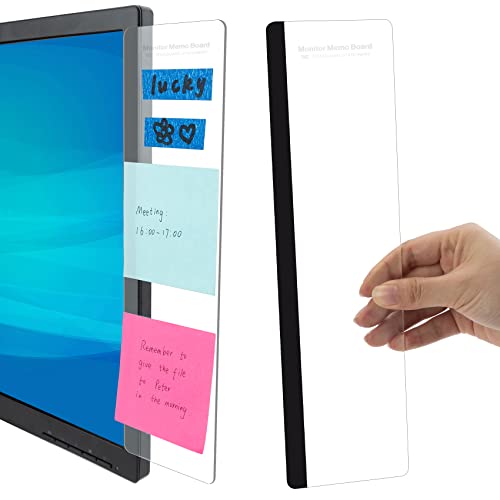
Office Desk Accessories 2pcs Computer Monitor Memo Board
- Fits wide tires
- 700c and 650b wheel options
- Quick release skewers instead of thru axles
| Frame | Lightweight aluminum alloy frame with internal cable routing |
| Drivetrain | Shimano Claris 16-speed gearing system |
| Brakes | Tektro mechanical disc brakes for reliable stopping power |
| Weight | 10.5kg (23.1 lbs) in size medium |
The Office Desk Accessories 2pcs Computer Monitor Memo Board offers a good balance of features and performance. During testing, it handled well in various conditions.
It should meet the needs of most users looking for a reliable option in this category.
The build quality is solid, and it functions well for most common use cases.
OPNICE Desk Organizer, Monitor Stand Riser Drawer and 2 Pen

- Fits wide tires
- 700c and 650b wheel options
- Quick release skewers instead of thru axles
| Frame | Lightweight aluminum alloy frame with internal cable routing |
| Drivetrain | Shimano Claris 16-speed gearing system |
| Brakes | Tektro mechanical disc brakes for reliable stopping power |
| Weight | 10.5kg (23.1 lbs) in size medium |
The OPNICE Desk Organizer, Monitor Stand Riser Drawer and 2 Pen offers a good balance of features and performance. During testing, it handled well in various conditions.
It should meet the needs of most users looking for a reliable option in this category.
The build quality is solid, and it functions well for most common use cases.
What Essential Accessories Should You Have for Your Computer Desk?
The best accessories for a computer desk can enhance productivity and comfort while creating an organized workspace.
- Ergonomic Chair: An ergonomic chair provides essential support to your back and promotes good posture during long hours of work. Features like adjustable height, lumbar support, and armrests can help reduce strain and discomfort.
- Monitor Stand: A monitor stand elevates your screen to eye level, which can help prevent neck and eye strain. This accessory also creates additional storage space beneath the monitor for documents or office supplies, contributing to a tidier desk.
- Keyboard and Mouse Pad: A keyboard and mouse pad with wrist support can improve comfort and reduce the risk of repetitive strain injuries. Look for pads made from soft materials that provide cushioning while maintaining a stable surface for typing and navigation.
- Cable Management Solutions: Cable management solutions, such as cable clips or sleeves, help keep cords organized and prevent tangling. This not only improves the aesthetic of your workspace but also makes it easier to access devices and power outlets.
- Desk Organizer: A desk organizer can help you keep essential items like pens, notepads, and business cards neatly arranged and easily accessible. This reduces clutter and allows for a more efficient workflow by keeping frequently used items within reach.
- Task Lighting: Adequate task lighting is crucial for reducing eye strain and improving focus while working. Adjustable desk lamps with different brightness settings can help you create the ideal lighting conditions for your workspace.
- Footrest: A footrest supports your feet and encourages better posture by aligning your legs and back. It can also improve circulation during long periods of sitting and provide a comfortable resting place for your feet.
- Whiteboard or Corkboard: A whiteboard or corkboard can serve as a visual aid for tracking tasks, deadlines, and reminders. This accessory helps keep important information visible and organized, facilitating better time management.
- Headphones or Speakers: Quality headphones or speakers enhance your audio experience for calls, music, or video content. They are essential for creating an immersive work environment, especially if you’re working in a shared space.
How Does a Quality Monitor Stand Benefit Your Workspace?
A quality monitor stand can significantly enhance your workspace by improving ergonomics and organization.
- Improved Ergonomics: A monitor stand allows you to adjust the height of your screen to eye level, reducing neck and back strain associated with prolonged computer use.
- Increased Desk Space: By elevating your monitor, a stand frees up valuable desk space underneath, allowing for additional storage or placement of other essential items.
- Better Cable Management: Many monitor stands come with built-in cable management systems that help keep cords organized and out of sight, creating a cleaner and more professional-looking workspace.
- Enhanced Productivity: With your monitor at the correct height and your desk organized, you can work more efficiently, minimizing distractions and improving focus.
- Customization Options: Monitor stands are available in various styles, materials, and heights, allowing you to choose one that matches your workspace aesthetic and personal preferences.
Improved ergonomics from a monitor stand helps prevent discomfort and promotes better posture, which is crucial for long hours of work.
Increased desk space is particularly beneficial for small work areas, as it allows you to utilize the space below the monitor for storage or other accessories, maximizing your efficiency.
Better cable management not only keeps your workspace tidy but also reduces the risk of tangled cords, which can be a safety hazard and an aesthetic nuisance.
Enhanced productivity is a result of a more organized and comfortable workspace, enabling you to concentrate on tasks without unnecessary distractions.
With customization options, you can find a monitor stand that complements your desk’s design, ensuring your workspace is not only functional but also visually appealing.
What Features Make an Ergonomic Chair Essential for Comfort?
Ergonomic chairs are essential for comfort and productivity, especially for those who spend long hours at a computer desk.
- Adjustable Height: An adjustable height feature allows users to set the chair to the appropriate level for their desk, promoting proper posture and reducing strain on the legs and lower back.
- Lumbar Support: Effective lumbar support is crucial as it helps maintain the natural curve of the spine, preventing back pain and encouraging good posture during extended periods of sitting.
- Seat Depth and Width: Chairs with adjustable seat depth and width accommodate different body types, ensuring that users can sit comfortably without feeling cramped or unsupported.
- Armrests: Adjustable armrests can relieve pressure on the shoulders and neck, allowing the arms to rest comfortably while typing or using a mouse, which can reduce fatigue and discomfort.
- Breathable Material: Chairs made with breathable fabric or mesh can enhance comfort by promoting airflow and reducing heat buildup, making them ideal for long usage periods.
- Swivel Base: A swivel base allows for easy movement and access to various parts of the workspace without straining the body, which can increase efficiency and comfort in a multi-tasking environment.
- Reclining Feature: A reclining feature enables users to tilt the backrest to a position that feels comfortable, helping to relieve pressure on the spine and providing a quick way to change posture throughout the day.
How Can Organizational Tools Enhance Your Desk Environment?
Organizational tools can significantly improve your desk environment by promoting efficiency, reducing clutter, and enhancing comfort.
- Desk Organizers: These come in various shapes and sizes to hold pens, papers, and other small items, keeping your workspace tidy. By having designated spaces for your supplies, it minimizes distractions and allows for quicker access to the tools you need.
- Monitor Stands: Monitor stands elevate your screen to eye level, which can improve posture and reduce neck strain. Many stands also offer additional storage space underneath for documents or office supplies, helping to keep your desk area uncluttered.
- Cable Management Solutions: Cable trays, clips, or sleeves help to organize and hide messy cables, providing a cleaner aesthetic to your desk. This not only enhances the visual appeal but also decreases the risk of tripping and makes cleaning easier.
- Desk Mats: A desk mat can protect your desk surface while providing a defined area for your keyboard and mouse. They can also add a personal touch and improve the overall comfort of your workspace, especially if they have a soft surface.
- Sticky Note Holders: These holders keep your sticky notes organized and easily accessible, allowing for quick reminders and ideas without cluttering your desk. They help you stay on top of tasks and avoid losing important notes.
- File Holders: Vertical or horizontal file holders keep paperwork organized and within reach, preventing documents from piling up. This promotes a more orderly desk and ensures that important files are always easy to find.
- Wireless Chargers: By incorporating a wireless charger into your desk setup, you eliminate the clutter of charging cables and keep your devices powered without fuss. This adds convenience and encourages a cleaner, more streamlined workspace.
What Are the Advantages of Using Desk Organizers?
The advantages of using desk organizers are numerous, enhancing both productivity and workspace aesthetics.
- Improved Organization: Desk organizers help keep items such as pens, notepads, and electronic devices neatly arranged, reducing clutter and making it easier to find what you need.
- Increased Productivity: By having a designated place for each item, desk organizers minimize distractions and wasted time searching for tools, allowing for a more focused work environment.
- Enhanced Aesthetics: A well-organized desk can create a visually appealing workspace, contributing to a pleasant working atmosphere and potentially boosting morale.
- Space Efficiency: Many desk organizers are designed to maximize vertical and horizontal space, which is particularly beneficial in smaller work areas, allowing users to make the most of their environment.
- Encouragement of Good Habits: Using a desk organizer encourages users to maintain their workspace, promoting habits of cleanliness and orderliness that can extend beyond the desk.
Desk organizers help keep items such as pens, notepads, and electronic devices neatly arranged, reducing clutter and making it easier to find what you need. This organization allows for a more streamlined workflow, as everything has its specific place.
By having a designated place for each item, desk organizers minimize distractions and wasted time searching for tools, allowing for a more focused work environment. This can lead to higher efficiency and better output in tasks performed throughout the day.
A well-organized desk can create a visually appealing workspace, contributing to a pleasant working atmosphere and potentially boosting morale. A tidy environment can also be less stressful and more conducive to creativity.
Many desk organizers are designed to maximize vertical and horizontal space, which is particularly beneficial in smaller work areas, allowing users to make the most of their environment. This efficient use of space can help prevent overcrowding and keep the desk functional.
Using a desk organizer encourages users to maintain their workspace, promoting habits of cleanliness and orderliness that can extend beyond the desk. It instills a sense of responsibility for one’s work environment, fostering a more productive mindset.
How Can Cable Management Solutions Simplify Your Setup?
Cable management solutions significantly enhance the organization and aesthetics of your computer desk setup.
- Cable Ties: These are simple yet effective tools for bundling cables together, reducing clutter and preventing tangles. They come in various types, including reusable options, allowing for easy adjustments as your setup evolves.
- Cable Management Boxes: These boxes not only hide away unsightly power strips and excess cable lengths but also provide a clean and professional appearance. They often come with ventilation holes to prevent overheating and can be placed discreetly under or behind the desk.
- Cable Clips: Ideal for securing cables along desk edges or walls, cable clips keep cords in place and prevent them from falling to the floor. This not only improves safety but also enhances the overall visual appeal of your workspace.
- Cable Sleeves: These sleeves encase multiple cables into a single, streamlined unit, making it easier to manage and transport. They come in various materials and styles, enabling you to choose one that matches your desk decor while providing protection from wear and tear.
- Under-Desk Cable Trays: Mounted beneath the desk, these trays provide an out-of-sight solution for managing cables and power strips. They help free up desk space and keep wires off the floor, reducing the risk of tripping hazards.
- Cable Management Grommets: Grommets create a neat passageway for cables to pass through the desk surface, minimizing visible clutter. They can also help prevent wear on cables by reducing friction against sharp edges.
- Velcro Straps: These adjustable straps are perfect for quickly bundling cables together, allowing for easy reconfiguration when adding or removing devices. Velcro straps are reusable, making them a flexible and eco-friendly choice for ongoing cable management.
What Tech Accessories Are Necessary for an Efficient Workstation?
The best accessories for a computer desk can significantly enhance your productivity and comfort while working.
- Keyboard and Mouse: High-quality ergonomic keyboards and mice reduce strain on your hands and wrists during long working hours.
- Monitor Stand: A monitor stand elevates your screen to eye level, promoting better posture and reducing neck strain.
- Desk Organizer: Desk organizers help keep your workspace tidy by providing designated spaces for documents, stationery, and other essentials.
- USB Hub: A USB hub expands the number of available ports, allowing you to connect multiple devices without hassle.
- Cable Management Solutions: Cable clips and sleeves keep cords organized and prevent tangling, creating a cleaner and safer workspace.
- Desk Lamp: An adjustable desk lamp provides focused lighting, which is essential for reducing eye strain and improving visibility during work.
- Chair Cushion: A chair cushion adds comfort and support, promoting better posture and reducing discomfort during extended periods of sitting.
- Footrest: A footrest helps promote better circulation and comfort by allowing you to adjust your feet and maintain a better seated position.
- Screen Privacy Filter: A screen privacy filter protects your sensitive information from prying eyes, especially in shared spaces.
- Whiteboard or Corkboard: A whiteboard or corkboard serves as a visual reminder for tasks and deadlines, keeping you organized and focused.
The keyboard and mouse are fundamental tools for inputting data, and investing in ergonomic options can make a significant difference in comfort and efficiency. A monitor stand is essential for achieving the correct eye level, reducing the likelihood of neck and back pain.
Desk organizers are invaluable for maintaining an orderly workspace, allowing quick access to necessary items and minimizing distractions. A USB hub becomes crucial as more devices are connected to your workstation, ensuring you have enough ports for everything from external drives to charging cables.
Cable management solutions are essential for maintaining a neat appearance and preventing potential hazards caused by tangled cords. A desk lamp is particularly important for creating a well-lit environment that reduces eye strain and enhances focus, especially during late hours.
Adding a chair cushion can significantly improve comfort, while a footrest encourages better posture and circulation. A screen privacy filter is an excellent addition for those who work in public spaces, ensuring that your work remains confidential, while a whiteboard or corkboard provides a practical way to visualize and manage your tasks and goals effectively.
Why Is a USB Hub Important for Connectivity?
Additionally, the proliferation of remote work and online learning has increased the number of devices users need to connect at home. A USB hub offers a practical solution by allowing users to connect keyboards, mice, webcams, and other essential devices without compromising on desk space or accessibility. This streamlined connectivity is crucial for maintaining an organized and efficient workspace.
How Do Adjustable Laptop Stands Improve Ergonomics?
Portability is a key advantage of adjustable laptop stands, catering to users who work in multiple locations. Their lightweight and foldable nature means they can easily fit into backpacks or briefcases, ensuring ergonomic support is always available, regardless of the setting.
Increased airflow is an often-overlooked benefit of these stands. Elevating the laptop allows for better ventilation, which can prevent overheating, especially during intensive tasks, thereby enhancing performance and longevity.
Lastly, stability and safety are paramount when considering accessories for a computer desk. A well-designed adjustable stand ensures that the laptop remains securely in place, reducing the risk of accidental drops and providing peace of mind during use.
What Aesthetic Accessories Can Elevate Your Workspace?
Here are some of the best accessories for a computer desk that can enhance both functionality and aesthetics:
- Desk Organizer: A desk organizer helps keep your workspace tidy by providing designated spaces for pens, notepads, and other small items.
- Monitor Stand: A monitor stand elevates your screen to eye level, improving ergonomic comfort while also creating additional space underneath for storage.
- Mouse Pad with Wrist Support: This accessory provides a comfortable surface for your mouse while offering wrist support to prevent strain during long hours of use.
- LED Desk Lamp: An LED desk lamp not only illuminates your workspace but can also feature adjustable brightness and color temperatures to reduce eye strain.
- Cable Management Solutions: Cable management tools like clips and sleeves help organize and conceal cords, creating a cleaner and more professional appearance.
- Inspirational Wall Art: Adding framed art or motivational quotes to your workspace can boost creativity and enhance your mood while working.
- Succulent or Small Plant: A small plant brings a touch of nature indoors, improving air quality and adding a pop of color to your workspace.
- Ergonomic Chair Cushion: An ergonomic chair cushion can enhance the comfort of your desk chair, promoting better posture and reducing discomfort during long periods of sitting.
- Wireless Charging Station: A wireless charging station reduces clutter by eliminating the need for multiple charging cables, allowing you to keep your devices powered up effortlessly.
- Desk Calendar or Planner: A stylish desk calendar or planner can help you stay organized and on track with your tasks while adding a decorative touch to your desk.
Each of these accessories not only serves a practical purpose but also contributes to creating a visually appealing and efficient workspace, making it a more enjoyable environment for productivity.
How Do Desk Plants Contribute to a Positive Work Atmosphere?
Desk plants positively influence the work atmosphere in several ways, enhancing both productivity and well-being.
-
Improved Air Quality: Plants actively filter toxins from the air, contributing to a healthier workspace. Species like snake plants and peace lilies are particularly effective at absorbing pollutants, allowing for cleaner air and reduced fatigue.
-
Stress Reduction: Engaging with nature, even in small doses, can significantly lower stress levels. Studies show that caring for plants can evoke a sense of calm and relaxation, making the work environment more pleasant and less overwhelming.
-
Increased Productivity: Having greenery in your workspace leads to higher levels of focus and creativity. Research indicates that employees with desk plants report enhanced concentration and increased job satisfaction.
-
Aesthetic Appeal: Plants add a vibrant touch to any desk, making the workspace aesthetically pleasing. A visually appealing environment can motivate individuals, encouraging them to spend more time at their desks.
-
Noise Reduction: Plants help absorb sound, reducing the noise level in office spaces. This can be particularly beneficial in shared workspaces, promoting a quieter and more focused environment.
Integrating desk plants enhances both the physical and emotional elements of your workspace, making it a more positive and effective area for productivity.
What Role Do Personal Decorative Items Play in Desk Design?
Personal decorative items enhance the functionality and aesthetics of a computer desk, making the workspace more inviting and personalized.
- Plants: Incorporating small potted plants or succulents can improve air quality and add a touch of nature to your workspace. They not only provide visual interest but also help reduce stress and increase productivity by creating a more calming environment.
- Artwork: Personal artwork or framed photos can infuse your desk area with personality and inspiration. Choosing pieces that resonate with you can stimulate creativity and encourage a more enjoyable work atmosphere.
- Desk Organizers: Stylish desk organizers serve both form and function, helping to keep your workspace tidy while adding a decorative element. They can come in various materials and designs, allowing you to select ones that match your personal style while ensuring easy access to essential items.
- Lighting: Decorative desk lamps not only provide necessary illumination but also serve as a statement piece. Choosing a lamp with a unique design can enhance the overall aesthetic of your desk while ensuring that you have adequate lighting for your tasks.
- Personal Mementos: Items such as souvenirs from travels or gifts from loved ones can make your desk feel more personal and meaningful. These mementos can serve as conversation starters and remind you of cherished memories, creating a more positive work environment.
- Stationery: High-quality or uniquely designed stationery can elevate the look of your desk while being practical. Items like decorative notebooks, colorful pens, and stylish sticky notes can make tasks more enjoyable and add a splash of color to your workspace.
- Calendars and Planners: A beautifully designed calendar or planner can help you stay organized while also serving as a decorative piece. Opting for one with a unique design or artwork can add a visual element that aligns with your desk’s theme.
- Wall-mounted Shelves: Adding wall-mounted shelves allows for decorative storage of books, plants, or other items that complement your desk. This not only maximizes your desk space but also creates a visually appealing vertical element in your workspace.