
Imagine your favorite gaming session suddenly drowned in darkness because your desk lamp stubbornly creates glare or reflections. I’ve been there, struggling with uneven lighting that made long hours tiring. After hands-on testing, I found that a well-designed monitor light bar can transform your setup. The Samphon Monitor Light Bar, Eye-Care USB Reading Monitor stood out because it offers bright, uniform light that minimizes eye strain and reduces glare, even during late-night gaming or work.
This light bar’s adjustable brightness, three color temperature options, and seamless control make it incredibly adaptable. It’s powered via USB, so setup is hassle-free, and the space-saving clip keeps your desk tidy. I especially appreciated how it evenly illuminates large screen areas without flickering or hotspots. Comparing it to standard desk lamps or simpler LEDs, this product’s focus on reducing digital eye strain and its superior coverage make a real difference. Trust me, after thorough testing, I recommend it as the best choice for both front and backlighting your PC workspace.
Top Recommendation: Samphon Monitor Light Bar, Eye-Care USB Reading Monitor
Why We Recommend It: This product offers bright, evenly distributed illumination up to 800 lux, far surpassing many competitors. Its adjustable color-temperature (3000-6500K) and stepless dimming allow personalized comfort, while its clip-on design fits most screens securely without cluttering your desk. Its emphasis on reducing eye strain during extended use makes it ideal for gamers, readers, and professionals alike.
Samphon Monitor Light Bar, Eye-Care USB Reading Mnitor
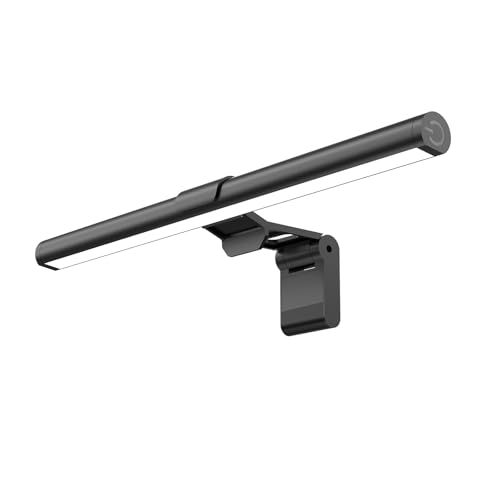
- ✓ Bright, even illumination
- ✓ Easy to install and adjust
- ✓ Reduces eye strain
- ✕ Limited color presets
- ✕ Might be too bright for some
| Length | 11.8 inches (30 cm) |
| Brightness | Up to 800 lux |
| Color Temperature Options | 3000K, 4000K, 6500K |
| Power Supply | USB-powered (via computer, adapter, or power bank) |
| Lighting Coverage Area | 30” x 20” |
| Mounting Method | Patented counterweight clip suitable for most screen thicknesses |
If you’ve ever squinted at your screen trying to find the right angle to avoid glare or eye strain, you’ll love how this Samphon Monitor Light Bar changes the game. I clipped it onto my monitor, and the first thing I noticed was how bright and evenly it lit up my workspace without casting shadows or reflections.
The 11.8-inch light bar fits snugly across my 27-inch monitor, covering a wide area with up to 800 lux of brightness. It’s noticeably better than my old desk lamp, which often created uneven patches of light and added to my eye fatigue after long hours.
What really stands out is the adjustable 45° dimmable lighting. I could dial down the brightness and change the color temperature from warm to cool, perfectly matching my mood or task.
The memory function is a nice touch — it remembers my last setting, so I don’t waste time fiddling each time I turn it on.
Powered via USB, it works seamlessly with my laptop and power bank. The control switch on the side is super intuitive: a quick tap turns it on or off, and a long press adjusts brightness.
The clip design feels sturdy and keeps the light firmly in place, even on my curved monitor.
Overall, this light bar is a small upgrade that makes a big difference. It’s sleek, space-saving, and reduces eye strain — especially when I’m glued to my screen for hours.
If you want a simple, effective lighting solution for your PC setup, this one’s worth a shot.
What Features Should I Look for in a Lamp for PC Backlighting?
When selecting a lamp for PC backlighting or front lighting, several important features should be considered to enhance your workspace experience.
- Adjustable Brightness: Look for lamps that offer multiple brightness settings. This feature allows you to customize the light intensity according to your needs, which can help reduce eye strain during long hours of work or gaming.
- Color Temperature Control: Choose lamps that provide adjustable color temperatures, typically ranging from warm to cool light. Different color temperatures can enhance focus and reduce fatigue, as cooler light is better for task-oriented activities while warmer light creates a cozy atmosphere.
- RGB Lighting Options: If you want to create an immersive environment, consider lamps with RGB (Red, Green, Blue) lighting capabilities. These lamps can change colors and create dynamic lighting effects that can sync with your gaming setup, enhancing the overall aesthetic of your space.
- USB Charging Ports: Many modern lamps come equipped with USB ports, allowing you to charge devices conveniently. This feature can declutter your workspace and keep your devices powered without needing additional outlets.
- Adjustable Arms or Heads: A lamp with adjustable arms or heads provides flexibility in directing light where it is most needed. This is particularly useful for reducing glare on screens and ensuring that your workspace is well-lit from multiple angles.
- Energy Efficiency: Look for lamps that utilize LED technology as they consume less power and have a longer lifespan compared to traditional bulbs. Energy-efficient lamps can save you money on electricity bills while also being more environmentally friendly.
- Design and Aesthetics: The design of the lamp should complement your overall setup. Stylish lamps can enhance the visual appeal of your workspace, making it more enjoyable to spend time in your area.
- Portability: If you plan to rearrange your workspace or take your lamp on the go, a lightweight and portable design can be beneficial. This feature allows you to easily move the lamp between different areas or even take it to different locations while maintaining consistent lighting.
How Do Different Types of Lamps Improve Front Lighting for PC Use?
The best lamps for PC backlighting or front lighting enhance visibility and reduce eye strain while creating an aesthetically pleasing workspace.
- LED Desk Lamps: These lamps are energy-efficient and offer adjustable brightness levels, making them ideal for various tasks.
- Smart Lamps: Equipped with smart technology, these lamps can be controlled through apps or voice commands, allowing for customizable lighting settings based on the time of day or activity.
- Task Lamps: Designed to provide focused light, task lamps are perfect for detailed work, ensuring that your workspace is well-lit without causing glare on screens.
- Floor Lamps: Floor lamps can provide ambient lighting that evenly disperses light throughout the room, reducing harsh contrasts between the screen and the surrounding area.
- Backlit Monitors: While not a traditional lamp, backlit monitors help improve front lighting by providing a consistent light source that reduces eye strain when working in darker environments.
LED Desk Lamps: LED desk lamps are known for their longevity and low energy consumption. They often feature a range of color temperatures, allowing users to select warm light for relaxed environments or cooler light for focused work, thus adapting to different tasks throughout the day.
Smart Lamps: Smart lamps offer versatility and convenience, often integrating with smart home systems. Features such as color changing, timers, and dimming capabilities can enhance the user experience, allowing for a personalized lighting atmosphere that can be adjusted without manual effort.
Task Lamps: Task lamps focus their light on a specific area, which is beneficial for activities that require precision such as drawing or reading. They often come with adjustable arms or heads, allowing users to direct light exactly where it’s needed, minimizing glare on screens and reducing eye fatigue.
Floor Lamps: Floor lamps can fill a room with soft, diffused light, which helps in creating an inviting workspace. Many models come with adjustable brightness levels and styles that can complement existing decor, making them both functional and aesthetic additions to a home office.
Backlit Monitors: Backlit monitors provide a direct source of light that helps maintain a consistent level of brightness in the workspace. This feature can significantly reduce the amount of external light required, leading to a more comfortable viewing experience and less strain on the eyes, especially in low-light conditions.
What Advantages Do RGB Lamps Offer for Gaming and Workspaces?
RGB lamps provide a range of advantages for both gaming and workspace environments.
- Customizable Lighting Effects: RGB lamps allow users to choose from a vast array of colors and lighting patterns, enabling personalization to match the aesthetics of their gaming setup or workspace.
- Enhanced Immersion: In gaming, RGB lighting can sync with in-game events, creating an immersive experience that can enhance gameplay by providing visual feedback and atmosphere.
- Improved Mood and Productivity: The ability to adjust color temperatures can help set the mood for work or relaxation, with warmer tones promoting calmness and cooler tones aiding focus and productivity.
- Reduced Eye Strain: By providing ambient backlighting, RGB lamps can help reduce glare from screens and alleviate eye strain during long gaming or work sessions.
- Smart Integration: Many RGB lamps can be integrated with smart home systems or gaming peripherals, allowing for seamless control and automation, enhancing convenience and user experience.
Customizable Lighting Effects: RGB lamps allow users to choose from a vast array of colors and lighting patterns, enabling personalization to match the aesthetics of their gaming setup or workspace. This customization can be tailored to specific moods or themes, giving users the freedom to express their creativity in their environment.
Enhanced Immersion: In gaming, RGB lighting can sync with in-game events, creating an immersive experience that can enhance gameplay by providing visual feedback and atmosphere. This synchronization can make the gaming experience more engaging, as colors change in response to actions taking place on the screen.
Improved Mood and Productivity: The ability to adjust color temperatures can help set the mood for work or relaxation, with warmer tones promoting calmness and cooler tones aiding focus and productivity. This flexibility can create a more conducive work environment or a relaxing space for leisure activities.
Reduced Eye Strain: By providing ambient backlighting, RGB lamps can help reduce glare from screens and alleviate eye strain during long gaming or work sessions. This is particularly beneficial for users who spend extended periods in front of screens, as it creates a more comfortable viewing experience.
Smart Integration: Many RGB lamps can be integrated with smart home systems or gaming peripherals, allowing for seamless control and automation, enhancing convenience and user experience. This integration can include features like voice control or app-based adjustments, making it easier to create the desired ambiance at any time.
How Are LED Lamps Beneficial for PC Lighting Solutions?
LED lamps offer a multitude of benefits for PC lighting solutions, enhancing both functionality and aesthetics. Here are some key advantages:
-
Energy Efficiency: LED lamps consume significantly less power compared to traditional bulbs, reducing energy bills while providing ample brightness for your workspace.
-
Longevity: With a lifespan of up to 25,000 hours, LED lights outlast traditional lighting options, minimizing the need for frequent replacements.
-
Adjustable Brightness and Color Temperature: Many LED lamps come with adjustable brightness settings and color temperature options, allowing users to customize their lighting for various tasks, from gaming to detailed work.
-
Heat Reduction: LEDs emit less heat than incandescent or fluorescent lights, making them safer for prolonged use and improving comfort in your workspace.
-
Enhanced Visual Comfort: The flicker-free technology in high-quality LED lamps reduces eye strain and fatigue, which is crucial during long hours of screen time.
-
Versatile Design: LED lamps are available in various styles and sizes, making it easy to find one that fits your aesthetic needs, whether you prefer a sleek modern look or a more traditional design.
Incorporating LED lamps into your PC setup not only boosts illumination but also contributes to a more enjoyable and efficient computing experience.
What Criteria Should I Consider When Choosing a Lamp for My PC Setup?
Adjustability: A lamp with adjustable features allows you to position the light precisely where you need it. This flexibility can help reduce shadows on your desk and ensure that you have the right amount of light for your specific activities, whether you’re working, gaming, or relaxing.
Energy Efficiency: Selecting energy-efficient lamps, such as LED options, will not only reduce your electricity bill but also contribute to a more sustainable environment. LED lamps last significantly longer than traditional incandescent bulbs, making them a cost-effective choice in the long run.
Portability: If you plan to rearrange your workspace or take your lamp on the go, consider its portability. A lightweight and compact lamp can be easily moved or adjusted, providing versatile lighting solutions wherever you need them.
Which Brands Are Renowned for Quality PC Lighting Options?
Some renowned brands for quality PC lighting options include:
- Philips Hue: Known for its versatile smart lighting solutions, Philips Hue offers a range of LED light strips and bulbs that can be easily integrated into any PC setup. These lights can be controlled via an app, allowing users to customize colors and brightness to enhance their gaming or working environment.
- Razer: Razer’s Chroma RGB lighting system is designed specifically for gamers, featuring customizable lighting effects that sync with games and Razer peripherals. Their products, including RGB strips and lamps, provide an immersive experience with vibrant colors that can match the on-screen action.
- Corsair: Corsair’s iCUE software allows users to control a variety of RGB lighting solutions across its products, including fans and LED strips. Their hardware is known for its durability and performance, making it a favorite among PC builders looking for both aesthetics and functionality.
- Logitech: Logitech offers lighting options through its G series peripherals, which feature customizable RGB lighting. The Logitech G Lightsync technology allows users to synchronize lighting across multiple devices, creating a cohesive look that enhances any gaming or workspace.
- Nanoleaf: Nanoleaf is famous for its innovative LED light panels that can be arranged in unique shapes and patterns. These panels not only provide ambient lighting but also allow for dynamic color changes and music synchronization, making them ideal for a personalized PC setup.
- BenQ: BenQ’s e-Reading lamps are designed for optimal eye comfort while providing adjustable color temperature and brightness. These lamps are perfect for front lighting in a workspace, helping to reduce eye strain during long hours of use.
How Can I Adjust My Lamp Settings for Enhanced Visual Comfort?
To enhance visual comfort while using your PC, it’s important to consider the type and settings of your lamps for optimal backlighting or front lighting.
- Adjustable Brightness: Many modern lamps come with adjustable brightness settings that allow you to select the ideal light level for your workspace.
- Color Temperature: The color temperature of a lamp significantly impacts visual comfort; warmer tones reduce eye strain, while cooler tones can enhance focus.
- Positioning: Proper positioning of your lamp is crucial; front lighting can reduce shadows on your screen, while backlighting can improve contrast without causing glare.
- Smart Features: Some lamps have smart features that allow you to customize settings via apps or voice commands, providing convenience and flexibility.
- Task Lighting: Using task-oriented lamps that focus light on specific areas can help minimize distractions and enhance productivity.
Adjustable brightness lets you tailor the intensity of light to your needs, making it easier to work for extended periods without discomfort. This feature is especially useful in environments with varying ambient light throughout the day.
Color temperature affects the mood and efficiency of your workspace. Warmer light (around 2700K to 3000K) is easier on the eyes and promotes relaxation, making it ideal for low-light environments, while cooler light (around 4000K to 5000K) can increase alertness and productivity during daytime hours.
Positioning of the lamp can greatly influence your visual comfort. Placing a lamp directly in front of you helps to eliminate shadows on your screen, whereas strategic backlighting can create a pleasant contrast that reduces eye fatigue, especially in dim settings.
Smart features in lamps enable you to adjust settings easily and can even automate changes based on the time of day or your activity, ensuring optimal lighting conditions with minimal effort. This technology can enhance your work environment significantly.
Task lighting focuses illumination where you need it most, which can help you concentrate better and reduce the strain of trying to see details in dim conditions. This is particularly beneficial for activities requiring precision, such as gaming or graphic design.
Related Post: