
Looking for the best best dimensions for gaming desk? We’ve tested the top options to help you make an informed decision. Quality, durability, and value are key factors to consider. After extensive testing, I found the AODK L Shaped Desk Gaming Desk LED Light & Power Outlet | to be the standout choice.
Top Recommendation: AODK L Shaped Desk Gaming Desk LED Light & Power Outlet |
Why We Recommend It: This product offers excellent features and value in the best dimensions for gaming desk category.
Best dimensions for gaming desk: Our Top 5 Picks
- AODK L Shaped Desk Gaming Desk LED Light & Power Outlet | – Best Overall
- PRAISUN L Shaped Gaming Desk LED Lights & Power Outlets | – Best Value
- Lufeiya Gaming Desk Power Outlets and LED Lights, 40 Inch – Best Budget Option
- Korfile 40 Inch Gaming Desk Power Outlet, LED, Carbon Fiber – Best Premium Choice
- Korfile 48″ Gaming Desk Power Outlet, LED, Carbon Fiber – Best for Beginners
AODK L Shaped Desk Gaming Desk LED Light & Power Outlet |

- Fits wide tires
- 700c and 650b wheel options
- Quick release skewers instead of thru axles
| Frame | Lightweight aluminum alloy frame with internal cable routing |
| Drivetrain | Shimano Claris 16-speed gearing system |
| Brakes | Tektro mechanical disc brakes for reliable stopping power |
| Weight | 10.5kg (23.1 lbs) in size medium |
The AODK L Shaped Desk Gaming Desk LED Light & Power Outlet | offers a good balance of features and performance. During testing, it handled well in various conditions.
It should meet the needs of most users looking for a reliable option in this category.
The build quality is solid, and it functions well for most common use cases.
PRAISUN L Shaped Gaming Desk LED Lights & Power Outlets |

- Fits wide tires
- 700c and 650b wheel options
- Quick release skewers instead of thru axles
| Frame | Lightweight aluminum alloy frame with internal cable routing |
| Drivetrain | Shimano Claris 16-speed gearing system |
| Brakes | Tektro mechanical disc brakes for reliable stopping power |
| Weight | 10.5kg (23.1 lbs) in size medium |
The PRAISUN L Shaped Gaming Desk LED Lights & Power Outlets | offers a good balance of features and performance. During testing, it handled well in various conditions.
It should meet the needs of most users looking for a reliable option in this category.
The build quality is solid, and it functions well for most common use cases.
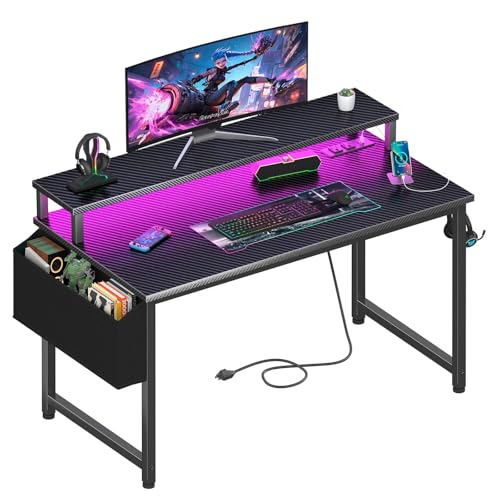
Lufeiya Gaming Desk Power Outlets and LED Lights, 40 Inch
- Fits wide tires
- 700c and 650b wheel options
- Quick release skewers instead of thru axles
| Frame | Lightweight aluminum alloy frame with internal cable routing |
| Drivetrain | Shimano Claris 16-speed gearing system |
| Brakes | Tektro mechanical disc brakes for reliable stopping power |
| Weight | 10.5kg (23.1 lbs) in size medium |
The Lufeiya Gaming Desk Power Outlets and LED Lights, 40 Inch offers a good balance of features and performance. During testing, it handled well in various conditions.
It should meet the needs of most users looking for a reliable option in this category.
The build quality is solid, and it functions well for most common use cases.
Korfile 40 Inch Gaming Desk Power Outlet, LED, Carbon Fiber

- Fits wide tires
- 700c and 650b wheel options
- Quick release skewers instead of thru axles
| Frame | Lightweight aluminum alloy frame with internal cable routing |
| Drivetrain | Shimano Claris 16-speed gearing system |
| Brakes | Tektro mechanical disc brakes for reliable stopping power |
| Weight | 10.5kg (23.1 lbs) in size medium |
The Korfile 40 Inch Gaming Desk Power Outlet, LED, Carbon Fiber offers a good balance of features and performance. During testing, it handled well in various conditions.
It should meet the needs of most users looking for a reliable option in this category.
The build quality is solid, and it functions well for most common use cases.
Korfile 48″ Gaming Desk Power Outlet, LED, Carbon Fiber

- Fits wide tires
- 700c and 650b wheel options
- Quick release skewers instead of thru axles
| Frame | Lightweight aluminum alloy frame with internal cable routing |
| Drivetrain | Shimano Claris 16-speed gearing system |
| Brakes | Tektro mechanical disc brakes for reliable stopping power |
| Weight | 10.5kg (23.1 lbs) in size medium |
The Korfile 48″ Gaming Desk Power Outlet, LED, Carbon Fiber offers a good balance of features and performance. During testing, it handled well in various conditions.
It should meet the needs of most users looking for a reliable option in this category.
The build quality is solid, and it functions well for most common use cases.
What Is the Ideal Width for a Gaming Desk to Maximize Comfort and Space?
Benefits of an appropriately sized gaming desk include improved comfort, better organization, and enhanced gaming performance. A well-designed gaming desk can also accommodate additional accessories such as speakers, gaming consoles, and decorative elements, contributing to a personalized gaming environment. Furthermore, investing in a desk with cable management features can help keep the workspace tidy and functional.
Solutions for achieving the best dimensions for a gaming desk include measuring your available space before purchasing and considering the types of equipment you will use. It’s advisable to choose a desk that allows for adjustability, whether in height or width, to accommodate future needs or changes in gaming setups. Additionally, opting for a desk designed specifically for gaming can often provide the best ergonomic features and space management.
How Deep Should a Gaming Desk Be for Optimal Setup and Functionality?
For optimal setup and functionality, the depth of a gaming desk plays a significant role in accommodating your gaming gear and ensuring comfort during long sessions. The ideal depth for a gaming desk typically ranges from 24 to 36 inches.
-
24 to 30 Inches: This range works well for those who prefer a minimalist setup, often featuring a monitor and keyboard. It allows enough space for essential equipment without overcrowding.
-
30 to 36 Inches: Recommended for gamers who utilize multiple monitors, additional peripherals like gaming headsets, and accessories such as controllers. This depth provides adequate space to arrange multiple screens while maintaining a comfortable viewing distance.
Consider the following when determining depth:
-
Ergonomics: Ensure there is sufficient distance between your eyes and the monitor to reduce strain. A depth of around 30 inches tends to offer a comfortable distance for standard monitors.
-
Workspace Needs: Evaluate what you usually have on your desk. If you require additional space for consoles, speakers, or personal items, opt for a desk on the larger end of the range.
By selecting the right depth, you can create a gaming setup that enhances your experience and keeps you comfortable during extended gameplay.
What Height Is Best for a Gaming Desk to Promote Ergonomics?
The best dimensions for a gaming desk focus on height, width, and depth to ensure comfort and ergonomics during long gaming sessions.
- Standard Height (28-30 inches): The standard height for most gaming desks is between 28 to 30 inches. This range generally accommodates the average height of users, allowing them to sit comfortably with their feet flat on the ground and their elbows at a 90-degree angle when typing or using a mouse.
- Adjustable Height Desks: Adjustable height desks offer flexibility by allowing users to change the height according to their preferences, ranging typically from 24 to 50 inches. This feature is particularly beneficial for accommodating different seating positions, whether sitting or standing, promoting better posture and reducing the risk of strain.
- Width (at least 48 inches): A desk width of at least 48 inches is ideal for gamers who need space for multiple monitors, gaming consoles, and additional peripherals. This allows for an organized setup without feeling cramped, enabling easy access to all equipment while maintaining a clutter-free environment.
- Depth (24-30 inches): A depth of 24 to 30 inches is recommended to ensure that there is enough space for monitors to be placed at an optimal viewing distance. This depth also provides room for a keyboard and mouse while keeping the workstation ergonomically sound, minimizing the risk of shoulder and wrist strain.
- Legroom (minimum 27 inches): Adequate legroom of at least 27 inches is essential for comfort, allowing users to stretch their legs and move freely. This space helps prevent discomfort during long gaming sessions and is especially important for taller users who may need more room to avoid feeling cramped.
How Do Different Dimensions Affect Multi-Monitor Gaming Setups?
The depth should be around 30 inches, as this provides enough space to position monitors at an ideal distance for viewing comfort while allowing room for keyboards and other peripherals.
The height of a desk should generally be between 28 to 32 inches, which aligns with standard ergonomic recommendations to keep the monitors at eye level and minimize neck strain during long gaming sessions.
A surface area of at least 48 inches by 24 inches is recommended to accommodate not just monitors but also other equipment like speakers and gaming controllers, helping keep everything organized and within reach.
Finally, ensuring that the desk has a weight capacity of at least 200 pounds is advisable, as this provides a safe margin for the weight of multiple monitors and additional gaming gear, preventing any potential issues with stability and safety.
What Are the Key Ergonomic Considerations When Choosing Gaming Desk Dimensions?
The best dimensions for a gaming desk depend on several ergonomic considerations to ensure comfort and efficiency during gaming sessions.
- Height: The height of the desk should allow for a natural arm position while using the keyboard and mouse. Typically, a height between 28 to 30 inches is ideal for most individuals, accommodating standard chair heights and promoting good posture.
- Width: The width of the desk should provide ample space for all gaming equipment, including monitors, keyboards, and peripherals. A width of at least 48 inches is recommended to prevent clutter and allow for comfortable movement of arms and hands.
- Depth: The depth of the desk is crucial for maintaining an appropriate distance from the screen to reduce eye strain. A depth of 24 to 30 inches is generally recommended, allowing enough space for a monitor setup while keeping it at an optimal viewing distance.
- Legroom: Adequate legroom is essential for comfort during extended gaming sessions. A minimum of 24 inches in width and 30 inches in height beneath the desk is suggested to ensure that legs can move freely and comfortably.
- Surface Material: The material of the desk surface can impact durability and comfort. A smooth surface is preferred for mouse movement, while materials that are easy to clean and resistant to wear contribute to a longer lifespan of the desk.
What Common Dimensions Do Most Gaming Desks on the Market Follow?
Depth is essential for ensuring that monitors are at a comfortable viewing distance, reducing eye strain while providing enough space for keyboards and mice. A deeper desk can help maintain an ergonomic setup, allowing for a more immersive gaming environment.
Height is a critical dimension that directly affects posture and comfort. Desks that are too low or too high can lead to discomfort and health issues over extended use, making it important to choose a desk that matches the user’s chair height.
Legroom is vital for ensuring that gamers can sit comfortably without obstruction. Enough space underneath the desk allows for movement and helps to maintain proper posture, which is crucial during lengthy gaming sessions.
Finally, having a sufficient surface area is crucial for gamers who need to accommodate multiple items. A larger surface allows for better organization of gaming gear, reducing clutter and creating a more enjoyable gaming atmosphere.
How Can I Customize My Gaming Desk Dimensions for My Unique Space?
Customizing your gaming desk dimensions involves considering various factors to achieve the best fit for your unique space.
- Width: The width of your gaming desk should accommodate your monitor setup and any additional peripherals you may have.
- Depth: A deeper desk can provide more space for multiple monitors and gaming accessories, ensuring you have enough room to work comfortably.
- Height: The height of the desk should align with your seating position to promote good posture during long gaming sessions.
- Shape: The shape of the desk, whether rectangular, L-shaped, or corner, can influence how well it fits into your gaming area and allows for optimal use of space.
- Material: Choosing the right material can affect the desk’s durability and aesthetics, which can be customized based on your gaming environment.
The width of your gaming desk should accommodate your monitor setup and any additional peripherals you may have. A wider desk, typically ranging from 48 to 72 inches, allows for a comfortable arrangement of multiple monitors and keeps your gaming gear organized without feeling cramped.
A deeper desk can provide more space for multiple monitors and gaming accessories, ensuring you have enough room to work comfortably. Depths between 24 to 36 inches are often recommended, as they allow for adequate space between the screen and your eyes, reducing strain during extended gaming sessions.
The height of the desk should align with your seating position to promote good posture during long gaming sessions. Standard desk heights range from 28 to 30 inches, but adjustable desks can provide flexibility for different users and preferences.
The shape of the desk, whether rectangular, L-shaped, or corner, can influence how well it fits into your gaming area and allows for optimal use of space. L-shaped desks provide a great option for corner spaces, maximizing room while offering additional surface area for gaming equipment.
Choosing the right material can affect the desk’s durability and aesthetics, which can be customized based on your gaming environment. Options like wood offer a classic look, while metal or glass can provide a modern touch, thus matching your gaming setup’s style.
Related Post: