
Looking for the best best diy gaming desk? We’ve tested the top options to help you make an informed decision. Quality, durability, and value are key factors to consider. After extensive testing, I found the AODK 79 Inch Gaming Desk Shelves & DIY Pegboard, PC Desk to be the standout choice.
Top Recommendation: AODK 79 Inch Gaming Desk Shelves & DIY Pegboard, PC Desk
Why We Recommend It: This product offers excellent features and value in the best diy gaming desk category.
Best diy gaming desk: Our Top 5 Picks
- AODK 79 Inch Gaming Desk Shelves & DIY Pegboard, PC Desk – Best Overall
- Lufeiya Gaming Desk Power Outlets and LED Lights, 40 Inch – Best Value
- PRAISUN L Shaped Gaming Desk LED Lights & Power Outlets | – Best Budget Option
- AODK L Shaped Desk Gaming Desk LED Light & Power Outlet | – Best Premium Choice
- X-cosrack 33.5″ Small Gaming Desk LED Lights & Power – Best for Beginners
AODK 79 Inch Gaming Desk Shelves & DIY Pegboard, PC Desk

- Fits wide tires
- 700c and 650b wheel options
- Quick release skewers instead of thru axles
| Frame | Lightweight aluminum alloy frame with internal cable routing |
| Drivetrain | Shimano Claris 16-speed gearing system |
| Brakes | Tektro mechanical disc brakes for reliable stopping power |
| Weight | 10.5kg (23.1 lbs) in size medium |
The AODK 79 Inch Gaming Desk Shelves & DIY Pegboard, PC Desk offers a good balance of features and performance. During testing, it handled well in various conditions.
It should meet the needs of most users looking for a reliable option in this category.
The build quality is solid, and it functions well for most common use cases.
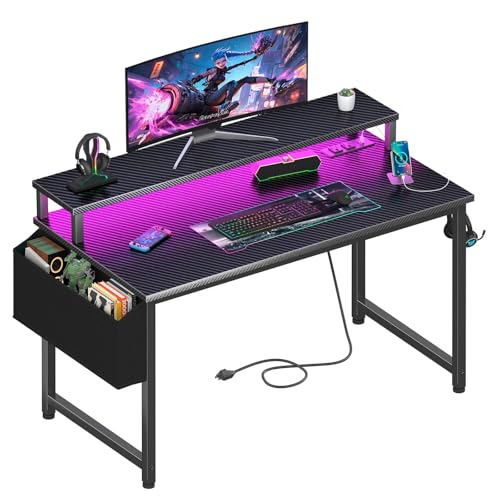
Lufeiya Gaming Desk Power Outlets and LED Lights, 40 Inch
- Fits wide tires
- 700c and 650b wheel options
- Quick release skewers instead of thru axles
| Frame | Lightweight aluminum alloy frame with internal cable routing |
| Drivetrain | Shimano Claris 16-speed gearing system |
| Brakes | Tektro mechanical disc brakes for reliable stopping power |
| Weight | 10.5kg (23.1 lbs) in size medium |
The Lufeiya Gaming Desk Power Outlets and LED Lights, 40 Inch offers a good balance of features and performance. During testing, it handled well in various conditions.
It should meet the needs of most users looking for a reliable option in this category.
The build quality is solid, and it functions well for most common use cases.
PRAISUN L Shaped Gaming Desk LED Lights & Power Outlets |

- Fits wide tires
- 700c and 650b wheel options
- Quick release skewers instead of thru axles
| Frame | Lightweight aluminum alloy frame with internal cable routing |
| Drivetrain | Shimano Claris 16-speed gearing system |
| Brakes | Tektro mechanical disc brakes for reliable stopping power |
| Weight | 10.5kg (23.1 lbs) in size medium |
The PRAISUN L Shaped Gaming Desk LED Lights & Power Outlets | offers a good balance of features and performance. During testing, it handled well in various conditions.
It should meet the needs of most users looking for a reliable option in this category.
The build quality is solid, and it functions well for most common use cases.
AODK L Shaped Desk Gaming Desk LED Light & Power Outlet |

- Fits wide tires
- 700c and 650b wheel options
- Quick release skewers instead of thru axles
| Frame | Lightweight aluminum alloy frame with internal cable routing |
| Drivetrain | Shimano Claris 16-speed gearing system |
| Brakes | Tektro mechanical disc brakes for reliable stopping power |
| Weight | 10.5kg (23.1 lbs) in size medium |
The AODK L Shaped Desk Gaming Desk LED Light & Power Outlet | offers a good balance of features and performance. During testing, it handled well in various conditions.
It should meet the needs of most users looking for a reliable option in this category.
The build quality is solid, and it functions well for most common use cases.
X-cosrack 33.5″ Small Gaming Desk LED Lights & Power

- Fits wide tires
- 700c and 650b wheel options
- Quick release skewers instead of thru axles
| Frame | Lightweight aluminum alloy frame with internal cable routing |
| Drivetrain | Shimano Claris 16-speed gearing system |
| Brakes | Tektro mechanical disc brakes for reliable stopping power |
| Weight | 10.5kg (23.1 lbs) in size medium |
The X-cosrack 33.5″ Small Gaming Desk LED Lights & Power offers a good balance of features and performance. During testing, it handled well in various conditions.
It should meet the needs of most users looking for a reliable option in this category.
The build quality is solid, and it functions well for most common use cases.
What Are the Essential Materials for Building a DIY Gaming Desk?
When building the best DIY gaming desk, several essential materials are needed to ensure functionality and aesthetics.
- Wood (Plywood or MDF): High-quality plywood or medium-density fiberboard (MDF) serves as the primary surface for the desk. These materials are sturdy, easy to work with, and can support the weight of multiple gaming components while allowing for customization in size and shape.
- Desk Legs or Supports: You can choose between pre-made desk legs, adjustable height desk legs, or even repurposed materials like old furniture legs. The legs need to be strong enough to support the weight of the desk and any equipment without wobbling.
- Fasteners (Screws, Brackets): Strong screws and brackets are essential for assembling the desk components securely. Using the right fasteners ensures that the desk remains stable and durable over time, preventing any structural failures during use.
- Surface Finish (Varnish or Paint): A surface finish like varnish or paint not only enhances the appearance of the desk but also protects the wood from scratches and spills. A good finish can also provide a smooth surface for gaming and working, making it visually appealing.
- Cable Management Accessories: Items such as cable trays, clips, or sleeves help keep cords organized and out of sight, reducing clutter around the gaming setup. Effective cable management ensures that the workspace remains tidy and helps prevent tangling or accidental disconnections.
- Mouse Pad or Desk Mat: A large mouse pad or desk mat can provide a consistent surface for mouse movement and protect the desk from wear and tear. Choosing a design that complements the gaming aesthetic can also enhance the overall look of the setup.
- Monitor Mount or Stand: A monitor mount or stand can save desk space and allow for ergonomic positioning of screens. This flexibility improves comfort during long gaming sessions and can help optimize the viewing angle for an immersive experience.
What Measurements Should You Keep in Mind When Designing Your DIY Gaming Desk?
When designing your DIY gaming desk, several key measurements are crucial for both functionality and comfort.
- Height: The ideal height for a gaming desk typically ranges from 28 to 30 inches, allowing most users to sit comfortably while maintaining good posture. Consider your chair’s height and ensure that your elbows can rest comfortably on the desk while using your keyboard and mouse.
- Depth: A desk depth of at least 24 to 30 inches is recommended to provide sufficient space for your monitor, keyboard, and gaming accessories without feeling cramped. This space helps in positioning your monitor at an appropriate distance to prevent eye strain and allows for ample room to maneuver your mouse.
- Width: The width of your gaming desk should ideally be at least 48 inches to accommodate multiple monitors or a spacious setup. This measurement ensures you have enough room for your gaming equipment, additional peripherals, and any decorative items you may want to display.
- Legroom: Ensuring at least 24 inches of clearance under the desk is essential for legroom, allowing you to stretch your legs comfortably while gaming. This space helps prevent discomfort during long gaming sessions by avoiding any obstruction that could impede your movement.
- Monitor Height: The top of your monitor should be at or slightly below eye level, which generally ranges from 15 to 20 inches above the desk surface. This positioning helps reduce neck strain, allowing you to maintain a more natural head position while gaming.
- Cable Management Space: Plan for an area or system that accommodates cables for monitors, keyboards, and other peripherals, ideally with a few extra inches to avoid clutter. This consideration will help keep your gaming setup neat and organized, minimizing distractions during gameplay.
How Can Specific Design Styles Enhance Your Gaming Experience?
Specific design styles can significantly enhance your gaming experience by improving comfort, functionality, and aesthetics.
- Minimalist Design: This style focuses on simplicity and functionality, reducing clutter and distractions. A minimalist gaming desk typically features clean lines and a straightforward layout, allowing gamers to concentrate fully on their gameplay without unnecessary visual noise.
- Industrial Style: Characterized by raw materials like metal and wood, industrial-style desks bring a rugged and urban feel to gaming setups. This design is not only durable but also provides ample space for multiple monitors and gaming gear, appealing to serious gamers who require a robust work surface.
- Ergonomic Design: An ergonomic gaming desk is tailored to promote good posture and comfort during long gaming sessions. Features like adjustable height and a sloped surface help reduce strain on the back and neck, which is crucial for maintaining focus and performance over extended periods.
- RGB and Themed Designs: Incorporating RGB lighting or themed elements related to games can create an immersive atmosphere that enhances the overall gaming experience. These designs can synchronize with in-game actions or set the mood, making the gaming environment more engaging.
- Modular Design: A modular gaming desk allows for customization and flexibility, enabling users to rearrange components based on their gaming needs. This adaptability ensures that gamers can optimize their setup for different genres or gaming styles, enhancing both comfort and efficiency.
- Vintage Style: This design evokes nostalgia and can create a unique gaming space that reflects personal style. Vintage desks often feature intricate details and classic materials, providing a warm and inviting atmosphere that contrasts with modern gaming aesthetics.
What Functional Features Should Every DIY Gaming Desk Include?
The best DIY gaming desk should incorporate several functional features to enhance the gaming experience and improve ergonomics.
- Adjustable Height: An adjustable height feature allows gamers to customize the desk to their preferred sitting or standing position, promoting better posture and comfort during long gaming sessions.
- Cable Management: Good cable management solutions, such as cable trays or clips, keep cords organized and out of sight, reducing clutter and preventing tangles, which can be distracting during gameplay.
- Ample Surface Space: A spacious surface area is essential to accommodate multiple monitors, gaming peripherals, and personal items, ensuring that everything is within reach and enhancing overall productivity.
- Built-in Storage: Integrated storage options like shelves, drawers, or compartments help keep gaming accessories, controllers, and other equipment organized and easily accessible, fostering a tidy gaming environment.
- Ergonomic Design: An ergonomic design includes features like rounded edges and a comfortable height that supports the natural arm position, helping to reduce strain and fatigue during extended gaming sessions.
- Customizable Aesthetics: The ability to personalize the desk’s look, whether through paint, decals, or materials, allows gamers to express their personality and create a unique gaming space that reflects their style.
- Sturdy Construction: A robust and stable frame is crucial to support the weight of gaming equipment and withstand the wear and tear of frequent use, ensuring longevity and reliability of the desk.
- Lighting Options: Integrated LED lighting or space for additional lighting can enhance the gaming atmosphere, providing ambient effects that complement the gaming experience while reducing eye strain in low-light conditions.
Which Tools and Equipment Are Crucial for Constructing Your DIY Gaming Desk?
Safety glasses and gloves are essential to protect yourself from dust and sharp objects while working on your project. Prioritizing safety ensures that your DIY experience is both productive and secure.
What Common Mistakes Should You Avoid When Assembling Your DIY Gaming Desk?
When assembling your DIY gaming desk, there are several common mistakes to avoid to ensure a functional and appealing setup.
- Poor Measurement: Accurate measurements are crucial when designing your desk. Failing to measure the space where the desk will go can result in a desk that is too large or too small, causing discomfort and inefficiency during gaming sessions.
- Neglecting Ergonomics: Many DIY enthusiasts overlook the importance of ergonomics. A desk that is not at the correct height or does not accommodate your gaming chair can lead to poor posture, discomfort, and even long-term health issues.
- Inadequate Cable Management: Without proper planning for cable management, your desk can quickly become cluttered with wires. This not only looks unprofessional but can also hinder airflow and create potential hazards.
- Using Low-Quality Materials: While it might be tempting to save money by using cheaper materials, this can backfire. Low-quality materials may not withstand the weight of your gaming equipment and can lead to a desk that is unstable or breaks down over time.
- Ignoring Personal Style: A DIY desk should reflect your personality and style. Skipping this step can result in a desk that feels generic and uninspiring, detracting from your overall gaming experience.
- Overlooking Storage Solutions: Many gamers have a lot of equipment, and failing to incorporate adequate storage can lead to a messy desk. Built-in shelves or drawers can keep your gaming accessories organized and easily accessible.
- Rushing the Assembly Process: Assembling your desk in haste can lead to mistakes or structural issues. Taking your time to ensure everything is put together correctly will result in a more durable and functional desk.
How Can You Personalize Your DIY Gaming Desk for Optimal Gaming Comfort?
To achieve optimal gaming comfort, personalizing your DIY gaming desk involves several key factors:
- Ergonomic Design: Creating a desk that promotes good posture is essential for long gaming sessions. This can include adjustable height features, a slanted surface for keyboard placement, and adequate space for your legs to move freely.
- Customizable Surface: The surface material and size should cater to your gaming setup, including space for multiple monitors or peripherals. Consider using materials that reduce glare or are easy to clean, such as laminate or matte finishes.
- Integrated Cable Management: A clutter-free workspace enhances focus and comfort. Building in cable management solutions, like channels or trays, helps organize wires and prevents tangling, maintaining an aesthetically pleasing setup.
- Personalized Accessories: Incorporating personalized elements such as RGB lighting, themed decorations, or customized mousepads can create an immersive gaming environment. These touches not only reflect your style but also enhance the overall gaming atmosphere.
- Storage Solutions: Adequate storage for games, controllers, and accessories can help keep your desk neat. Consider adding shelves, drawers, or under-desk storage to ensure everything is within reach yet organized.
- Comfort Features: Adding comfortable elements like a cushioned wrist rest, chair pads, or even a built-in beverage holder can significantly enhance your gaming experience. These features contribute to prolonged comfort during intense gaming marathons.