
Looking for the best best lighting position for computer desk? We’ve tested the top options to help you make an informed decision. Quality, durability, and value are key factors to consider. After extensive testing, I found the Micomlan Led Desk Lamp Clamp, Architect Desk Lamp for Home to be the standout choice.
Top Recommendation: Micomlan Led Desk Lamp Clamp, Architect Desk Lamp for Home
Why We Recommend It: This product offers excellent features and value in the best lighting position for computer desk category.
Best lighting position for computer desk: Our Top 5 Picks
- Micomlan Led Desk Lamp Clamp, Architect Desk Lamp for Home – Best Overall
- LED Desk Lamp Clamp, Architect Desk Lamp Dual Light and – Best Value
- Motumen Led Desk Lamp for Home Office, Eye-Care Desk Light – Best Budget Option
- Pzloz Led Desk Lamp for Office Home – Eye Caring Architect – Best Premium Choice
- Weilisi 10.2″ Desk Ring Light Stand, 360° Rotate Desk Lamps – Best for Beginners
Micomlan Led Desk Lamp Clamp, Architect Desk Lamp for Home

- Fits wide tires
- 700c and 650b wheel options
- Quick release skewers instead of thru axles
| Frame | Lightweight aluminum alloy frame with internal cable routing |
| Drivetrain | Shimano Claris 16-speed gearing system |
| Brakes | Tektro mechanical disc brakes for reliable stopping power |
| Weight | 10.5kg (23.1 lbs) in size medium |
The Micomlan Led Desk Lamp Clamp, Architect Desk Lamp for Home offers a good balance of features and performance. During testing, it handled well in various conditions.
It should meet the needs of most users looking for a reliable option in this category.
The build quality is solid, and it functions well for most common use cases.
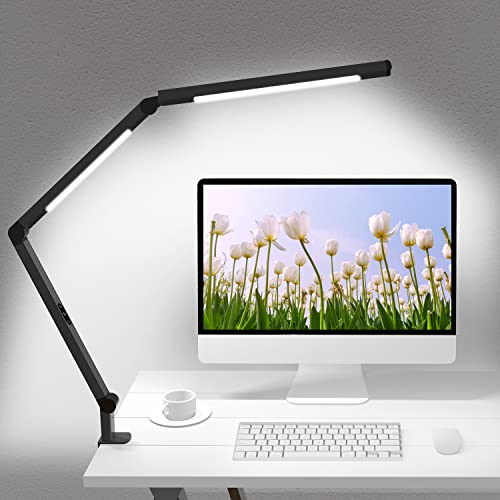
LED Desk Lamp Clamp, Architect Desk Lamp Dual Light and
- Fits wide tires
- 700c and 650b wheel options
- Quick release skewers instead of thru axles
| Frame | Lightweight aluminum alloy frame with internal cable routing |
| Drivetrain | Shimano Claris 16-speed gearing system |
| Brakes | Tektro mechanical disc brakes for reliable stopping power |
| Weight | 10.5kg (23.1 lbs) in size medium |
The LED Desk Lamp Clamp, Architect Desk Lamp Dual Light and offers a good balance of features and performance. During testing, it handled well in various conditions.
It should meet the needs of most users looking for a reliable option in this category.
The build quality is solid, and it functions well for most common use cases.
Motumen Led Desk Lamp for Home Office, Eye-Care Desk Light

- Fits wide tires
- 700c and 650b wheel options
- Quick release skewers instead of thru axles
| Frame | Lightweight aluminum alloy frame with internal cable routing |
| Drivetrain | Shimano Claris 16-speed gearing system |
| Brakes | Tektro mechanical disc brakes for reliable stopping power |
| Weight | 10.5kg (23.1 lbs) in size medium |
The Motumen Led Desk Lamp for Home Office, Eye-Care Desk Light offers a good balance of features and performance. During testing, it handled well in various conditions.
It should meet the needs of most users looking for a reliable option in this category.
The build quality is solid, and it functions well for most common use cases.
Pzloz Led Desk Lamp for Office Home – Eye Caring Architect

- Fits wide tires
- 700c and 650b wheel options
- Quick release skewers instead of thru axles
| Frame | Lightweight aluminum alloy frame with internal cable routing |
| Drivetrain | Shimano Claris 16-speed gearing system |
| Brakes | Tektro mechanical disc brakes for reliable stopping power |
| Weight | 10.5kg (23.1 lbs) in size medium |
The Pzloz Led Desk Lamp for Office Home – Eye Caring Architect offers a good balance of features and performance. During testing, it handled well in various conditions.
It should meet the needs of most users looking for a reliable option in this category.
The build quality is solid, and it functions well for most common use cases.
Weilisi 10.2″ Desk Ring Light Stand, 360° Rotate Desk Lamps

- Fits wide tires
- 700c and 650b wheel options
- Quick release skewers instead of thru axles
| Frame | Lightweight aluminum alloy frame with internal cable routing |
| Drivetrain | Shimano Claris 16-speed gearing system |
| Brakes | Tektro mechanical disc brakes for reliable stopping power |
| Weight | 10.5kg (23.1 lbs) in size medium |
The Weilisi 10.2″ Desk Ring Light Stand, 360° Rotate Desk Lamps offers a good balance of features and performance. During testing, it handled well in various conditions.
It should meet the needs of most users looking for a reliable option in this category.
The build quality is solid, and it functions well for most common use cases.
Why Is Proper Lighting Essential for Your Computer Desk?
Proper lighting is crucial for any computer desk setup due to its significant impact on productivity, health, and comfort. Insufficient or harsh lighting can lead to eye strain, headaches, and decreased focus, ultimately affecting work quality and efficiency. Here are several key aspects highlighting the importance of appropriate lighting:
-
Reduced Eye Strain: Glare from screens and inadequate ambient light can tire your eyes. Proper lighting helps balance light levels, minimizing discomfort.
-
Enhanced Focus and Productivity: Well-lit environments enhance visibility, leading to better concentration on tasks. Bright, evenly distributed light allows for clearer reading and detailed work, boosting overall productivity.
-
Health Benefits: Good lighting can improve posture by encouraging correct seating positions and reducing the need to lean forward to see. Adequate light reduces the risk of developing repetitive strain injuries and other ailments associated with poor work environments.
-
Mood Improvement: Natural or warm artificial lighting can enhance mood and motivation, creating a more enjoyable workspace. Proper lighting fosters a positive atmosphere, essential for sustained productivity.
Choosing the right lighting position and type is essential in creating a healthy, efficient, and inviting work environment.
How Does Proper Lighting Affect Eye Health and Comfort?
Proper lighting is essential for maintaining eye health and comfort, especially when working at a computer desk.
- Natural Light: Utilizing natural light can significantly reduce eye strain and improve mood. Positioning your computer desk near a window allows for ample daylight, which is softer on the eyes compared to artificial lighting.
- Task Lighting: Task lighting, such as desk lamps, provides focused illumination on your work area. This type of lighting helps to minimize glare on screens and can be adjusted to meet individual preferences, enhancing visibility and comfort during long hours of work.
- Ambient Lighting: Ambient lighting refers to the general illumination of the room. It’s important to ensure that the ambient light level is adequate to prevent excessive contrast between the screen and the surrounding environment, which can lead to eye fatigue.
- Positioning of Light Sources: The positioning of light sources is crucial for reducing glare and reflections on your computer screen. Ideally, light should come from the side or behind the viewer to minimize direct glare, allowing for a more comfortable viewing experience.
- Adjustable Brightness: Having the ability to adjust the brightness of your lighting can help accommodate different times of day and tasks. Brightness control enables you to reduce strain during low-light conditions and enhance clarity when needed, promoting better eye health.
What Are the Impacts of Lighting on Productivity and Focus?
The impacts of lighting on productivity and focus can significantly affect a person’s ability to work effectively at a computer desk.
- Natural Light: Exposure to natural light can enhance mood and energy levels, leading to increased productivity. Studies have shown that workers in environments with ample natural light experience fewer headaches and eye strain, which can improve focus and overall performance.
- Task Lighting: Task lighting, such as desk lamps, provides direct illumination for specific work areas, which can help reduce glare and shadows. Optimal task lighting should be adjustable and positioned to minimize reflections on screens while providing sufficient brightness for reading or writing tasks.
- Color Temperature: The color temperature of lighting influences alertness and concentration. Cooler light (around 5000K to 6500K) is often associated with higher productivity and focus, while warmer light (2700K to 3000K) can create a relaxed atmosphere but may reduce alertness if overused.
- Light Positioning: The best lighting position for a computer desk is typically to the side or behind the user, which helps avoid glare on the computer screen. Positioning the light source at an angle can provide even illumination and reduce eye strain, which is essential for maintaining focus during long work sessions.
- Adjustable Lighting: Having adjustable lighting options allows individuals to customize their workspace according to their needs. Dimming features or the ability to change the direction of light can help create the ideal environment for various tasks, enhancing both productivity and comfort.
What Are the Recommended Lighting Types for Computer Desks?
Ambient Lighting: Adequate ambient lighting is vital for maintaining a well-lit environment. It helps balance the light levels in the room, reducing the strain on your eyes when looking away from the screen to the surroundings, and creates a more comfortable atmosphere.
Natural Lighting: Natural light can have a significant positive impact on mood and productivity. Positioning your desk near a window allows you to benefit from sunlight during the day, which can help regulate your circadian rhythms and reduce the need for artificial lighting.
Adjustable Desk Lamps: These lamps offer flexibility and can be moved or angled to provide light exactly where it’s needed. They are beneficial for tasks that require precision, such as drafting or intricate computer work, as they can reduce glare on screens.
LED Strip Lights: These lights are excellent for ambient and decorative lighting. They can be installed under shelves or along the edges of a desk to create a soft, diffused light that enhances the workspace without being overly harsh or distracting.
What is Task Lighting and How Can It Improve Your Workspace?
Implementing task lighting in a workspace brings numerous benefits. It not only improves visual comfort but also contributes to a more aesthetically pleasing environment. Adjustable desk lamps, LED lighting, and natural light sources can all be integrated into a workspace to create an optimal lighting setup. Additionally, using dimmable options allows workers to tailor the light intensity based on the time of day or specific tasks, further enhancing comfort and productivity.
Best practices for achieving effective task lighting include positioning light sources to minimize glare on screens, using fixtures that provide even light distribution, and selecting bulbs with a color temperature that supports alertness and focus. For example, a color temperature of around 5000K mimics daylight, which can be beneficial for maintaining energy levels during work hours. Regularly assessing and adjusting the lighting situation can also ensure that it remains effective as work tasks change or as personal preferences evolve.
Are Ambient and Accent Lighting Important for Desk Setup?
Accent lighting, on the other hand, is used to draw attention to specific features of your desk or surrounding decor, such as artwork or plants. This type of lighting can create a more dynamic and inviting environment, making your workspace feel more personalized and inspiring.
Task lighting, while not always highlighted, is essential for activities requiring focused light, such as reading or detailed work. A well-positioned desk lamp can provide direct illumination where it’s needed most, reducing eye strain and improving concentration.
Proper positioning of lights is critical to enhance functionality and comfort. Ideally, ambient lights should be placed to evenly distribute light throughout the space, while task lights should be positioned to avoid glare on screens and reduce shadows from the body or hands when working.
What is the Ideal Position for a Desk Lamp?
Solutions for achieving the best lighting position include investing in adjustable task lights, using diffused bulbs to soften direct glare, and ensuring that ambient lighting is sufficient to fill the room without being harsh. Best practices also suggest regularly reassessing the lighting setup as part of ergonomic evaluations to accommodate changes in workspace layout or personal preferences, thereby maintaining an optimal working environment.
Should the Desk Lamp Be Placed on the Left or Right Side for Optimal Lighting?
Additionally, the type of lamp and its brightness can also play a significant role in effective lighting. A desk lamp with adjustable brightness and color temperature will allow you to customize the lighting to suit your specific needs and preferences. Ensuring that the lamp is positioned at an appropriate height and angle can further enhance its effectiveness, allowing you to create a workspace that is not only functional but also conducive to productivity.
How High Should Your Desk Lamp Be for Best Light Distribution?
The height of your desk lamp is crucial for optimal light distribution when working at a computer desk.
- Eye Level: Positioning the lamp at or slightly above eye level reduces glare on your screen and provides even illumination.
- Distance from Desk Surface: The lamp should be about 15 to 30 inches above the desk surface to ensure that the light covers the workspace adequately without causing shadows.
- Adjustability: Using a lamp with an adjustable arm or head allows you to fine-tune the height and angle of the light, catering to your specific needs and preferences.
- Type of Bulb: Consider the bulb type; LED bulbs can be positioned higher due to their focused light output, while softer bulbs may require lower placement for effective lighting.
- Work Area Size: The size of your desk and the area you need to illuminate can dictate the height; larger spaces may require taller lamps for broader light distribution.
Positioning the lamp at or slightly above eye level helps prevent screen glare and provides a balanced light that enhances visibility without straining your eyes.
Maintaining a distance of 15 to 30 inches from the desk surface allows the light to spread evenly, illuminating your workspace while minimizing any disruptive shadows that could hinder your work.
An adjustable lamp offers versatility, enabling you to change the height and angle as needed, ensuring optimal lighting conditions, especially when switching between different tasks.
Choosing the right type of bulb is also vital; LED bulbs can be more easily positioned higher without losing effectiveness, while incandescent bulbs may require a lower height for sufficient light coverage.
Finally, the size of your workspace plays a significant role; larger desks may necessitate taller lamps to ensure effective illumination across the entire area.
How Can You Minimize Glare from Your Computer Screen?
To minimize glare from your computer screen, consider the following lighting positions and adjustments:
- Adjust Lighting Angle: Position your desk lamp at an angle that avoids direct light hitting the screen.
- Use Soft Lighting: Opt for diffused or soft lighting instead of harsh, direct lights to reduce glare.
- Place Lights Behind the Monitor: Position lights behind your monitor to create a backlight effect which can help reduce the perceived glare on the screen.
- Consider Screen Position: Adjust the height and angle of your monitor to minimize reflections from overhead lights.
- Utilize Anti-Glare Screens: Attach an anti-glare filter to your monitor to physically reduce glare from surrounding light sources.
- Control Ambient Light: Use curtains or blinds to manage natural light coming into your workspace, preventing it from reflecting off your screen.
Adjust Lighting Angle: By positioning your desk lamp to illuminate your workspace without shining directly onto the screen, you can effectively minimize glare. Experiment with different angles to find the optimal position that provides adequate light for reading without creating reflections on the monitor.
Use Soft Lighting: Harsh, direct lighting can significantly contribute to glare on your screen. Choosing soft lighting options, such as LED bulbs with warm tones or lamps with shades, can help create a more comfortable working environment that reduces glare.
Place Lights Behind the Monitor: Setting up lights behind your monitor allows for a subtle backlight effect that can enhance visibility while reducing glare. This technique not only helps in minimizing reflections but also creates a pleasant visual contrast between the screen and the surrounding area.
Consider Screen Position: The position of your monitor is crucial in managing glare. Adjusting its height and tilt can help avoid reflections from overhead lights or windows, ensuring that your screen remains clear and easy to read.
Utilize Anti-Glare Screens: An anti-glare filter can be an effective solution for reducing glare caused by surrounding light sources. These screens are designed to diffuse light and minimize reflections, providing a clearer view of your monitor.
Control Ambient Light: Natural light can often create glare on your screen, so it’s important to manage it effectively. Using curtains or blinds can help control the amount of sunlight entering your workspace, thus reducing glare and improving visibility on your screen.
What Strategies Can Help Reduce Glare on Screens During Use?
To reduce glare on screens during use, several strategies can be employed:
- Adjust Screen Position: Position the monitor at an angle that minimizes reflection from windows or overhead lights.
- Use Anti-Glare Screens: Applying an anti-glare filter can help diffuse light and reduce reflections on the screen.
- Control Ambient Lighting: Use soft, diffused lighting in the workspace instead of harsh overhead lights to create a balanced environment.
- Position Light Sources Strategically: Place light sources behind the monitor or to the side to decrease direct light hitting the screen.
- Utilize Window Treatments: Installing shades or curtains can help manage natural light coming from windows, reducing glare from sunlight.
- Adjust Display Settings: Changing the brightness and contrast settings of the screen can help to counteract glare and improve visibility.
Adjusting the monitor’s position can significantly affect glare levels; tilting the screen slightly or moving it away from direct light sources helps create a more comfortable viewing angle.
Anti-glare screens are a practical solution as they provide a matte finish that diffuses light, making it easier to see the display without distraction from reflections.
Controlling ambient lighting involves using multiple light sources that provide softer illumination, which can help reduce the stark contrast between the screen and the surrounding area, thus minimizing glare.
Strategically positioning light sources, such as desk lamps, to the side or behind the monitor can effectively reduce direct light reflections on the screen, allowing for clearer visibility.
Window treatments like shades or blackout curtains can be particularly useful during certain times of the day to block out direct sunlight, which is a common cause of glare on screens.
Adjusting the display settings on the monitor, such as lowering brightness or increasing contrast, can also help to improve the screen’s visibility in bright conditions by making it easier to read without straining the eyes.
What Common Mistakes Should You Avoid When Setting Up Desk Lighting?
When setting up desk lighting, avoiding common mistakes can enhance both your workspace comfort and productivity.
- Incorrect Light Positioning: Placing the light source directly in front of or behind your computer screen can cause glare and reflections, making it difficult to see the screen clearly. Instead, position the light to the side or above to create a balanced and glare-free workspace.
- Using Inadequate Lighting: Relying solely on a single overhead light or using a lamp that doesn’t provide enough illumination can lead to eye strain and fatigue. It is essential to have sufficient lighting that covers the entire desk area, ideally combining ambient and task lighting for optimal visibility.
- Neglecting Color Temperature: Choosing a light with the wrong color temperature can affect your focus and mood; warm light can be relaxing but may cause drowsiness, while cool light can enhance alertness but may feel harsh. Aim for a neutral white light, typically around 4000K to 5000K, to create an inviting yet stimulating environment.
- Overlooking Adjustable Features: Not utilizing adjustable lighting can limit your ability to customize the lighting according to different tasks. Invest in lamps that allow you to change brightness levels or angles, ensuring you can adapt the lighting for reading, typing, or creative work effectively.
- Ignoring Natural Light: Failing to consider natural light sources can lead to poorly lit areas and create a workspace that feels gloomy. Strategically place your desk near windows to benefit from daylight while ensuring that artificial lighting compensates for darker conditions during the evening or cloudy days.
How Can Poor Lighting Choices Affect Your Work Environment?
- Glare on Screens: Glare from poorly positioned lights can create discomfort and strain on the eyes, making it difficult to focus on tasks.
- Inadequate Lighting Levels: Insufficient lighting can lead to eye fatigue and decreased productivity, as workers may struggle to see fine details.
- Color Temperature Issues: The wrong color temperature can affect mood and alertness, with cool light often being more stimulating and warm light providing a cozy atmosphere.
- Shadows and Contrast: Improper lighting can create shadows on your workspace, which can obscure visibility of important documents or objects, leading to mistakes.
- Health Risks: Poor lighting conditions can lead to long-term health issues such as headaches, eye strain, and even musculoskeletal problems due to improper posture while trying to avoid glare or shadows.